

Lecture 4

Parquet, DuckDB, Polars: A holy trinity

Agenda and Goals for Today

Lecture

  • Distributed file systems
  • Modern file types
  • Working with large tabular data on a single node
    • DuckDB
    • Polars

Lab

  • Run a similar task with Pandas, polars and duckdb

Review

  • We’ve introduced the cloud environment on AWS (or a version of it)
  • We’ve learned to move data to it
  • We’ve learned that parallelization in some problems can help with speeding computations

Looking forward

  • Today we’ll start looking at how to store data for efficiency, and tools to compute efficiently on it

  • Some parallelization is happening under the hood, but it is being utilized

  • We’ll start seeing the advantages of lazy evaluation, which requires thought and planning

  • Compute takes time and infrastructure, but the final product is often small

  • OLAP tools can work for a lot of the ETL work you’d need. We’ll spend today and next week on that

  • We’ll then proceed to how to actually analyze big data using models, leading us to Apache Spark

  • A cool part of the tools we’re using is that they don’t actually copy the data (saving time, I/O cost)

Filesystems

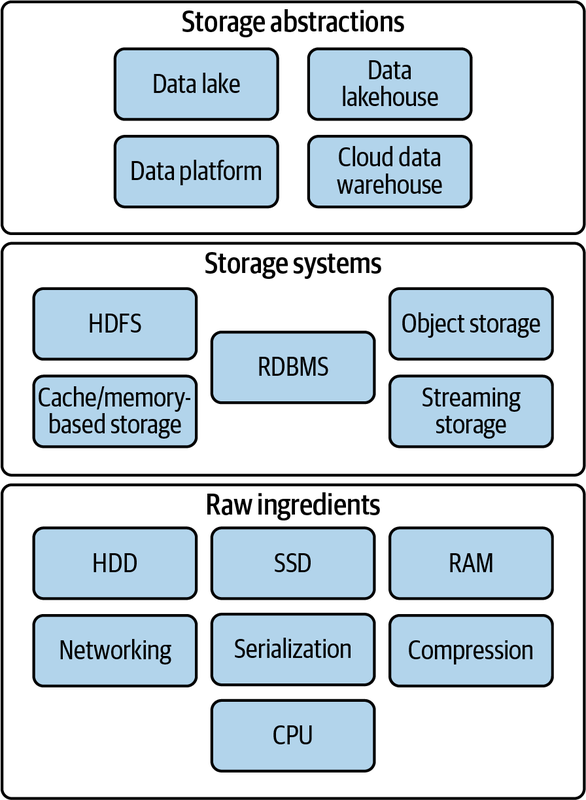
Raw ingredients of storage systems

  • Disk drives (magnetic HDDs or SSDs)
  • RAM
  • Networking and CPU
  • Serialization
  • Compression
  • Caching

Single machine vs. distributed storage

Single machine

  • They are commonly used for storing operating system files, application files, and user data files.
  • Filesystems are also used in databases to store data files, transaction logs, and backups.

Distributed storage

  • A distributed filesystem is a type of filesystem that spans multiple computers.
  • It provides a unified view of files across all the computers in the system.
  • Have existed before cloud

File storage

A file is a data entity with specific read, write, and reference characteristics used by software and operating systems.

Local disk

  • Operating system–managed filesystems on local disk partition of SSD or magnetic disk:
    • NTFS (Windows)
    • HFS+ (MacOS)
    • ext4 (Linux)() on a local disk partition of SSD or magnetic disk

Network-attached (NAS)

  • File storage system to clients over a network
  • Including redundancy and reliability, fine-grained control of resources, storage pooling across multiple disks for large virtual volumes, and file sharing across multiple machines

Cloud filesystems

  • Not object store (more on that later)
  • Not the virtual hard drive attached to a virtual machine
  • Fully managed filesystem which takes care of networking, managing disk clusters, failures, and configuration (Azure Files, Amazon Elastic Filesystem)
  • Backed by Object Store

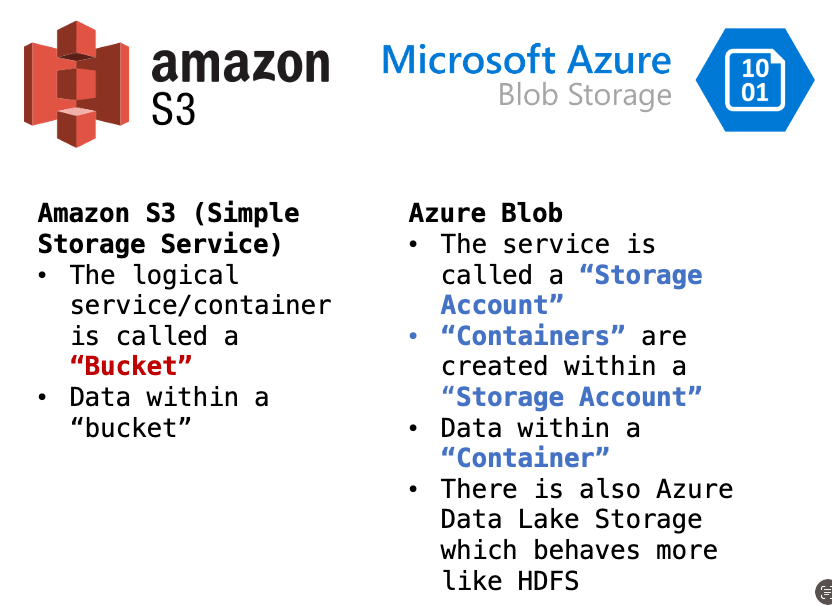
Object stores

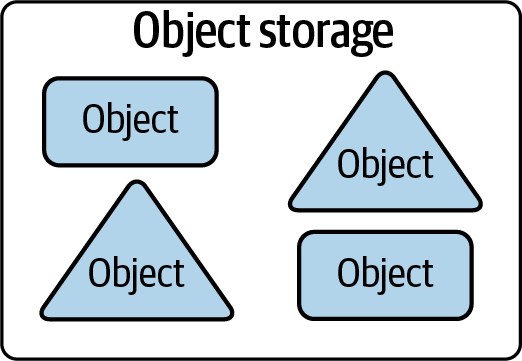
The term object storage is somewhat confusing because object has several meanings in computer science. In this context, we’re talking about a specialized file-like construct. It could be any type of file: TXT, CSV, JSON, images, videos, audio, or pretty much any type of file.

  • Contains objects of all shapes and sizes.
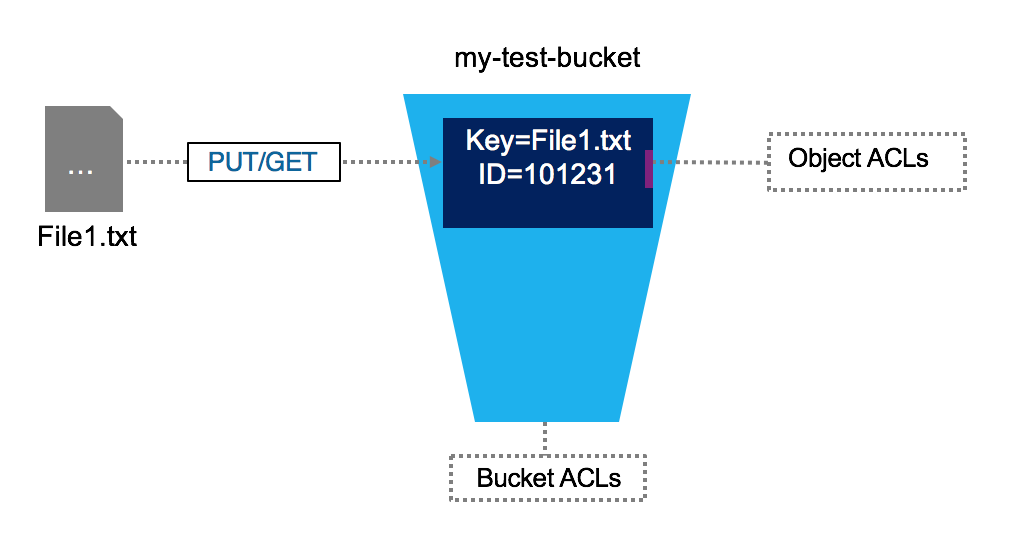
  • Every object gets a unique identifier
  • Objects are immutable; cannot be modifier in place (unlike local FS)
  • Distributed by design
  • Massively scalable REST API access

Distributed FS vs Object Store

Distributed File System Object Storage
Organization Files in hierarchical directories Flat organization (though there can be overlays to provide hierarchical files structure)
Method POSIX File Operations REST API
Immutability None: Random writes anywhere in file Immutable: need to replace/append entire object
Scalability Millions of files Billions of objects

Both provide:

  • Fault tolerance
  • Availability and consistency

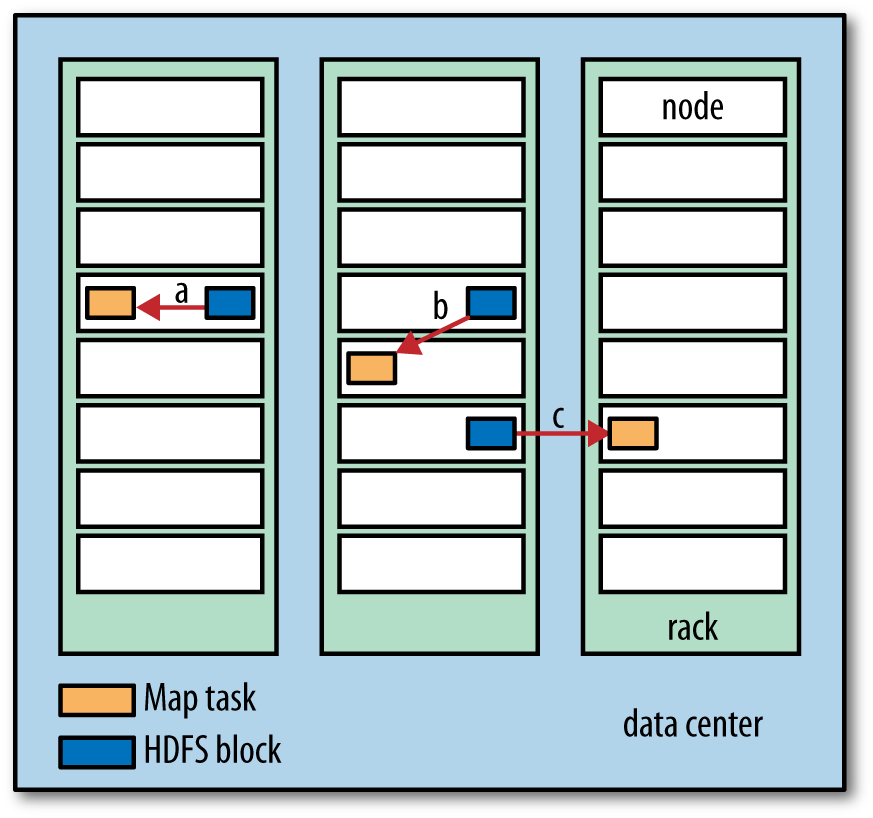
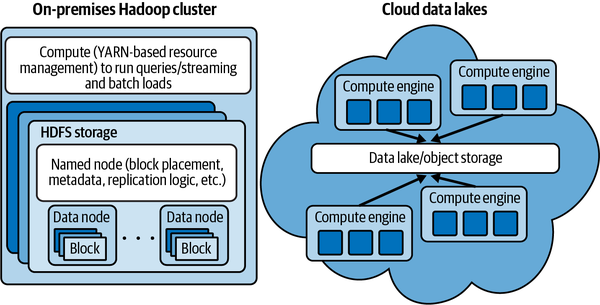
Before: Data locality (for Hadoop)

Today: de-coupling storage from compute

Data on-disk formats

Plain Text (CSV, TDF, FWF)

  • Pay attention to encodings!
  • Lines end in linefeed, carriage-return, or both together depending on the OS that generated
  • Typically, a single line of text contains a single record

JSON

Warning

JSON files have two flavors: JSON Lines vs. JSON. Typically when we say data is in JSON format, we imply it’s JSON Lines which means that there is a single JSON object per line, and there are multiple lines.

JSON Lines

Four records, one per line. No ending comma.

{"id":1, "name":"marck", "last_name":"vaisman"}
{"id":2, "name":"anderson", "last_name":"monken"}
{"id":3, "name":"amit", "last_name":"arora"}
{"id":4, "name":"abhijit", "last_name":"dasgupta"}

JSON

Four records enclosed in a JSON Array

[
  {"id":1, "name":"marck", "last_name":"vaisman"},
  {"id":2, "name":"anderson", "last_name":"monken"},
  {"id":3, "name":"amit", "last_name":"arora"},
  {"id":4, "name":"abhijit", "last_name":"dasgupta"},
]

Binary files

Issues with common file formats, particularly CSVs:

  • Still ubiquitous and highly error prone (even in 2023)
  • The default delimiter is also one of the most familiar characters in the English language—the comma
  • Not a uniform format
    • Delimiter (comma, tab, semi-colon, custom)
    • Quote characters (single or doble quote)
    • Escaping to appropriately handle string data
  • Doesn’t natively encode schema information
  • No direct support for nested structures
  • Encoding and schema information must be configured in the target system to ensure appropriate ingestion
  • Autodetection is a convenience feature provided in many cloud environments but is inappropriate for production ingestion, and can be painfully slow
  • Data engineers are often forced to work with CSV data and then build robust exception handling and error detection to ensure data quality on ingestion

Introducing Apache Parquet

Apache Parquet is an open-source columnar storage file format designed for efficient data storage and retrieval.

  • Created: 2013 by Twitter and Cloudera
  • Type: Columnar storage format
  • Purpose: Optimized for analytics workloads
  • License: Apache 2.0 (open source)
  • Ecosystem: Hadoop, Spark, Pandas, Polars, DuckDB, and more

Key Innovation: Store data by column instead of by row

Row vs Column Storage

Row-Oriented Storage (CSV, JSON)


Record 1: [ID=1, Name="Alice", Age=30, Salary=75000] Record 2: [ID=2, Name="Bob", Age=25, Salary=65000] Record 3: [ID=3, Name="Carol", Age=35, Salary=85000]

Stored as: Row1 → Row2 → Row3 → …

Column-Oriented Storage (Parquet)


ID Column: [1, 2, 3, ...] Name Column: ["Alice", "Bob", "Carol", ...] Age Column: [30, 25, 35, ...] Salary Column: [75000, 65000, 85000, ...]

Stored as: All IDs → All Names → All Ages → All Salaries

Why Columnar Storage?

Analytics Query Pattern

SELECT AVG(salary), MAX(salary)
FROM employees
WHERE age > 30;

Row Storage: Must read ALL columns for ALL rows

Column Storage: Only read age and salary columns

Result: 10-100x faster for analytical queries!

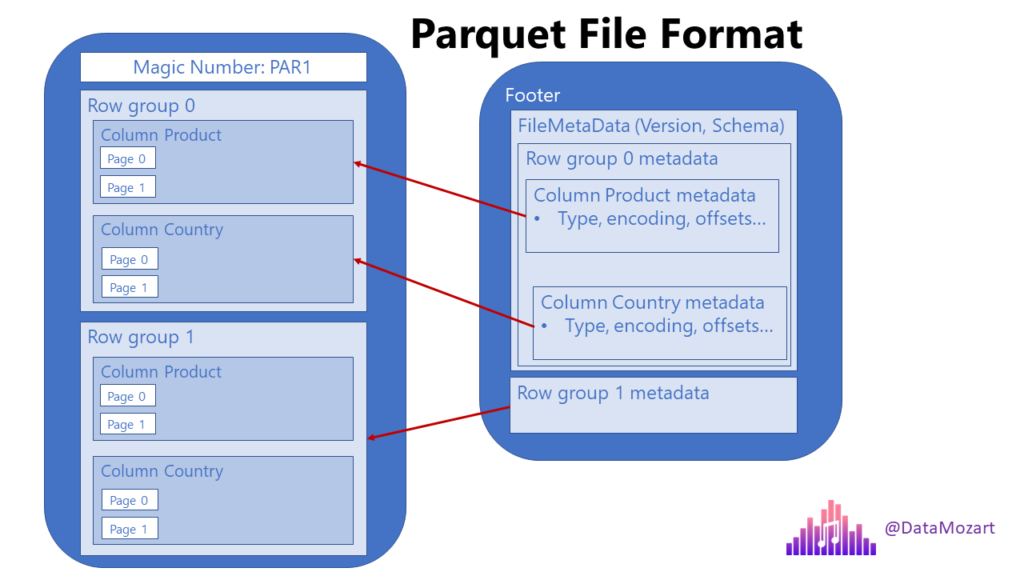
Parquet File Structure

┌─────────────────────────────────────────┐
│         Parquet File                    │
├─────────────────────────────────────────┤
│  4-byte Magic Number: PAR1              │
├─────────────────────────────────────────┤
│                                         │
│  ┌───────────────────────────────────┐  │
│  │  Row Group 1 (default: 128 MB)   │  │
│  │  ┌─────────┬─────────┬─────────┐ │  │
│  │  │Column A │Column B │Column C │ │  │
│  │  │(Pages)  │(Pages)  │(Pages)  │ │  │
│  │  └─────────┴─────────┴─────────┘ │  │
│  └───────────────────────────────────┘  │
│                                         │
│  ┌───────────────────────────────────┐  │
│  │  Row Group 2                      │  │
│  │  ┌─────────┬─────────┬─────────┐ │  │
│  │  │Column A │Column B │Column C │ │  │
│  │  └─────────┴─────────┴─────────┘ │  │
│  └───────────────────────────────────┘  │
│                                         │
├─────────────────────────────────────────┤
│  Footer (Metadata)                      │
│  • File schema                          │
│  • Column metadata                      │
│  • Row group metadata                   │
│  • Column statistics (min/max/nulls)    │
│  • Encoding information                 │
├─────────────────────────────────────────┤
│  4-byte Magic Number: PAR1              │
│  4-byte Footer Length                   │
└─────────────────────────────────────────┘

Key Components

1. Row Groups

  • Purpose: Horizontal partitioning of data
  • Default Size: 128 MB (configurable)
  • Benefit: Enable parallel processing and selective reading

2. Column Chunks

  • Purpose: All data for one column in one row group
  • Organization: Divided into pages
  • Benefit: Read only columns you need

3. Pages

  • Purpose: Unit of compression and encoding
  • Types: Data pages, dictionary pages, index pages
  • Benefit: Fine-grained access and efficient compression

Metadata, compression, and dictionary encoding

Metadata and Statistics

File-Level Metadata

  • Schema definition (column names, types, nesting)
  • Number of rows
  • Created by (writer version)
  • Key-value metadata

Column-Level Statistics

  • Min/Max values: Skip row groups outside query range
  • Null count: Optimize null handling
  • Distinct count: Cardinality estimation
  • Total compressed/uncompressed size: Storage metrics

Query Optimization: Read metadata first, skip irrelevant data!

Compression in Parquet

Supported Codecs

Codec Ratio Speed Use Case
Snappy 2-3x Very Fast Default, balanced
GZIP 4-6x Slow Cold storage, archival
LZ4 2-3x Very Fast Similar to Snappy
ZSTD 3-5x Fast Best overall (if available)
Brotli 4-7x Medium Web delivery
Uncompressed 1x Fastest Hot data, local SSD

Recommendation: Start with Snappy, test ZSTD for better compression

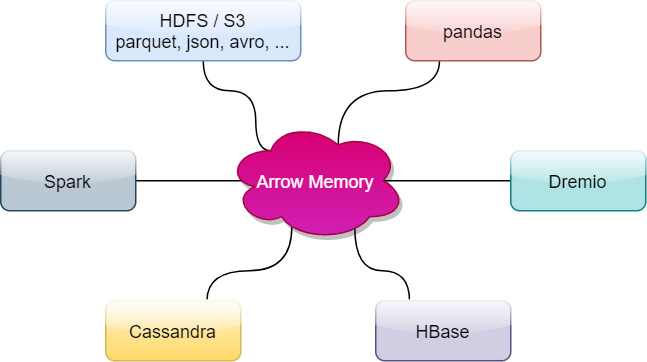
Apache Arrow: The Perfect Companion

What is Apache Arrow?

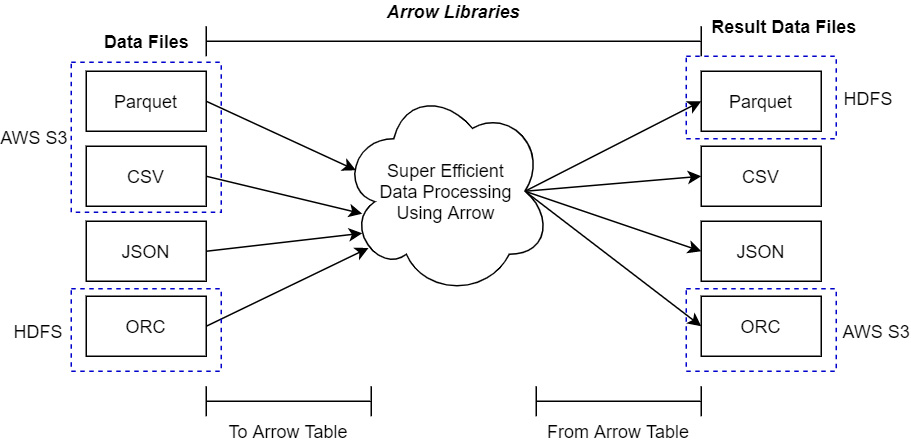
Apache Arrow is an in-memory columnar data format and set of libraries for efficient data interchange.

  • Created: 2016
  • Purpose: Zero-copy data sharing between tools
  • Format: Standardized columnar memory layout
  • Language Support: C++, Python, R, Java, JavaScript, Rust, Go, and more

Parquet Vs Arrow

┌─────────────────────────────────────────────────────┐
│                  STORAGE                            │
│              (Parquet Files)                        │
│  • Compressed                                       │
│  • On disk / S3                                     │
│  • Optimized for I/O                                │
└─────────────────┬───────────────────────────────────┘
                  │
                  │ Read/Write
                  │
                  ▼
┌─────────────────────────────────────────────────────┐
│                  MEMORY                             │
│              (Arrow Format)                         │
│  • Uncompressed                                     │
│  • In RAM                                           │
│  • Optimized for CPU processing                     │
└─────────────────┬───────────────────────────────────┘
                  │
                  │ Zero-Copy Share
                  │
        ┌─────────┼─────────┐
        │         │         │
        ▼         ▼         ▼
    ┌───────┐ ┌───────┐ ┌───────┐
    │Polars │ │DuckDB │ │Pandas │
    └───────┘ └───────┘ └───────┘

Parquet ↔︎ Arrow Relationship

Complementary Roles

Parquet (Storage):

  • Persistent storage format
  • Compressed for efficiency
  • Includes rich metadata
  • Optimized for I/O operations

Arrow (Memory):

  • In-memory processing format
  • Uncompressed for speed
  • Standardized layout
  • Optimized for CPU operations

Key Benefit: Convert between formats with minimal overhead

Zero-Copy Data Sharing

Traditional Approach (With Copying)

# Read Parquet → Pandas
df_pandas = pd.read_parquet("data.parquet")  # Copy 1

# Convert to NumPy
array = df_pandas.to_numpy()  # Copy 2

# Pass to ML library
model.fit(array)  # Copy 3

# Total: 3 copies in memory!

Arrow Approach (Zero-Copy)

# Read Parquet → Arrow
table = pa.parquet.read_table("data.parquet")

# Share with Polars (no copy)
df_polars = pl.from_arrow(table)

# Share with Pandas (no copy)
df_pandas = table.to_pandas(zero_copy_only=True)

# Total: 1 copy in memory!

Zero-Copy Example

Parquet Strengths Summary

┌─────────────────────────────────────────────────┐
│         PARQUET STRENGTHS                       │
├─────────────────────────────────────────────────┤
│  ✓ 70-90% compression ratio                     │
│  ✓ 10-100x faster analytical queries            │
│  ✓ Read only needed columns                     │
│  ✓ Skip irrelevant data (predicate pushdown)    │
│  ✓ Rich metadata for optimization               │
│  ✓ Cloud-native (S3, Azure, GCS)                │
│  ✓ Universal ecosystem support                  │
│  ✓ Schema evolution                             │
│  ✓ Parallel processing                          │
│  ✓ Self-describing format                       │
└─────────────────────────────────────────────────┘

Parquet Weaknesses Summary

┌─────────────────────────────────────────────────┐
│         PARQUET WEAKNESSES                      │
├─────────────────────────────────────────────────┤
│  ✗ Slower write performance (2-5x vs CSV)       │
│  ✗ Inefficient for single-row lookups           │
│  ✗ No native update/delete support              │
│  ✗ Immutable (requires rewrite to modify)       │
│  ✗ Overhead for small files (< 10 MB)           │
│  ✗ Complex format (steep learning curve)        │
│  ✗ Limited streaming support                    │
│  ✗ Not ideal for transactional workloads        │
│  ✗ Schema evolution requires planning           │
└─────────────────────────────────────────────────┘

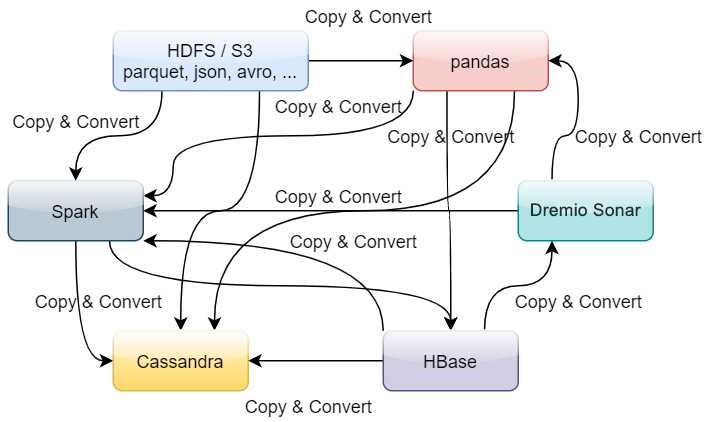
Before Arrow

After Arrow

Arrow Compatibility

Use Arrow to read/write CSVs and Parquet

Python

Use the pyarrow library or straight from pandas

import pandas as pd
pd.read_csv(engine = 'pyarrow')
pd.read_parquet

import pyarrow.csv
pyarrow.csv.read_csv()

import pyarrow.parquet
pyarrow.parquet.read_table()

R

Use the arrow package

library(arrow)

read_csv_arrow()
read_parquet()
read_json_arrow()

write_csv_arrow()
write_parquet()

Recommendation: save your intermediate and analytical datasets as Parquet!

When to Use Parquet

✅ Ideal Use Cases

  • Data warehousing and analytics
  • Data lakes (S3, Azure Blob, GCS)
  • Machine learning datasets (training data)
  • ETL pipelines (batch processing)
  • Historical data archival
  • Read-heavy workloads (10:1 read/write ratio or higher)
  • Large datasets (> 1 GB)
  • Column-based queries (aggregations, filtering)

When NOT to Use Parquet

❌ Poor Fit For

  • Transactional databases (OLTP)
  • Frequent updates/deletes
  • Real-time streaming (use Avro, Arrow IPC)
  • Small files (< 10 MB)
  • Row-based access patterns (single record lookups)
  • Write-heavy workloads
  • Append-only logs (use line-delimited JSON)
  • Immediate consistency requirements

Parquet Vs Other Formats

Feature Parquet CSV JSON Avro ORC
Compression Excellent Poor Poor Good Excellent
Read Speed Very Fast Slow Slow Fast Very Fast
Write Speed Medium Fast Fast Fast Medium
Schema Yes No Flexible Yes Yes
Nested Data Yes No Yes Yes Yes
Human Readable No Yes Yes No No
Analytics Excellent Poor Poor Good Excellent
Streaming Poor Good Good Excellent Poor

Polars + DuckDB + Parquet

The Modern Local Analytics Stack

Fast, flexible analytics on your laptop—no cluster required

The Challenge

Modern data science faces critical bottlenecks:

  • Volume: Datasets exceeding available RAM are increasingly common
  • Distribution: Data stored across cloud object storage (S3, Azure Blob, GCS)
  • Performance: Traditional tools (Pandas, SQLite) struggle with scale
  • Cost: Inefficient data processing translates to higher cloud costs

We need tools designed for modern data infrastructure from the ground up.

DuckDB

In‑process SQL OLAP engine with vectorized execution. Reads/writes Parquet and excels at joins, aggregations, and window functions—fast analytics without a server.

Side road: OLAP & OLTP

What is OLAP?

Online Analytical Processing

Systems designed for complex analytical queries

  • Handles business intelligence and reporting
  • Complex queries across large datasets
  • Primarily read-intensive with periodic bulk loads
  • Column-oriented storage optimized for analytics
  • Sub-second to minutes response time

What is OLTP?

Online Transaction Processing

Systems designed for real-time operational transactions

  • Handles daily business operations (sales, orders, payments)
  • Fast, short transactions with immediate results
  • Frequent inserts, updates, and deletes
  • Row-oriented storage optimized for writes
  • Millisecond response times with ACID guarantees

Head-to-Head Comparison

Aspect OLTP OLAP
Purpose Transaction processing Data analysis
Data Type Current operational Historical aggregated
Queries Simple, few rows Complex, millions of rows
Workload Heavy writes Heavy reads
Storage Row-based Column-based
Users Thousands+ concurrent Dozens of analysts
Response Milliseconds Seconds to minutes

OLAP Use Cases

Analytical Workloads

  • Business Intelligence: Sales trend analysis and revenue forecasting
  • Data Warehousing: Multi-dimensional reporting across departments
  • Financial Analysis: Quarterly performance aggregations and comparisons
  • Marketing Analytics: Campaign effectiveness across customer segments
  • Supply Chain: Historical demand patterns and inventory optimization

OLTP Use Cases

Operational Workloads

  • E-commerce: Processing customer orders and payments in real-time
  • Banking: ATM transactions, account updates, wire transfers
  • Inventory Management: Real-time stock level tracking and updates
  • CRM Systems: Customer data entry, modifications, and lookups
  • Booking Systems: Hotel/flight reservations with immediate confirmation

Back to normal programming

Polars

Rust‑based DataFrame with lazy and eager APIs, query optimization, and parallel execution. Arrow‑native for fast wrangling, grouping, joins, and analytics pipelines.

How They Interplay

Parquet dataset → [Scan + Pushdown] → DuckDB (SQL) ↔︎ Arrow ↔︎ Polars (Expressions) → Parquet (results)

  • Columnar synergy: skip unused columns
  • Row‑group pruning via statistics
  • Zero/low‑copy Arrow interchange
  • In‑process OLAP on a single machine

Why It’s Useful

  • Near‑warehouse performance
  • Efficient, larger‑than‑RAM reads
  • Interoperable across the data stack
  • Switch between SQL and expressions
  • Simple, low‑cost, no servers
  • Reproducible Parquet snapshots

Typical Workflows

  1. Explore: Query partitioned Parquet with DuckDB SQL for fast summaries.
  2. Transform: Build Polars lazy pipelines; push filters/projections into scans.
  3. Combine: Use DuckDB for heavy joins; hand off via Arrow to Polars.
  4. Persist: Save curated results/features back to Parquet for training or sharing.

Practical Tips

  • Partitioning: Use selective keys (e.g., dt=YYYY‑MM‑DD, region) and keep stats.
  • Column selection: Project only needed columns for faster scans.
  • File sizing: Target 100–512 MB files; row groups ~64–256 MB.
  • Schema evolution: Track types; avoid expensive casts and mixed dtypes.
  • I/O locality: Cache or work on local copies for iterative dev.
  • Interchange: Use Arrow for minimal copies between DuckDB and Polars.

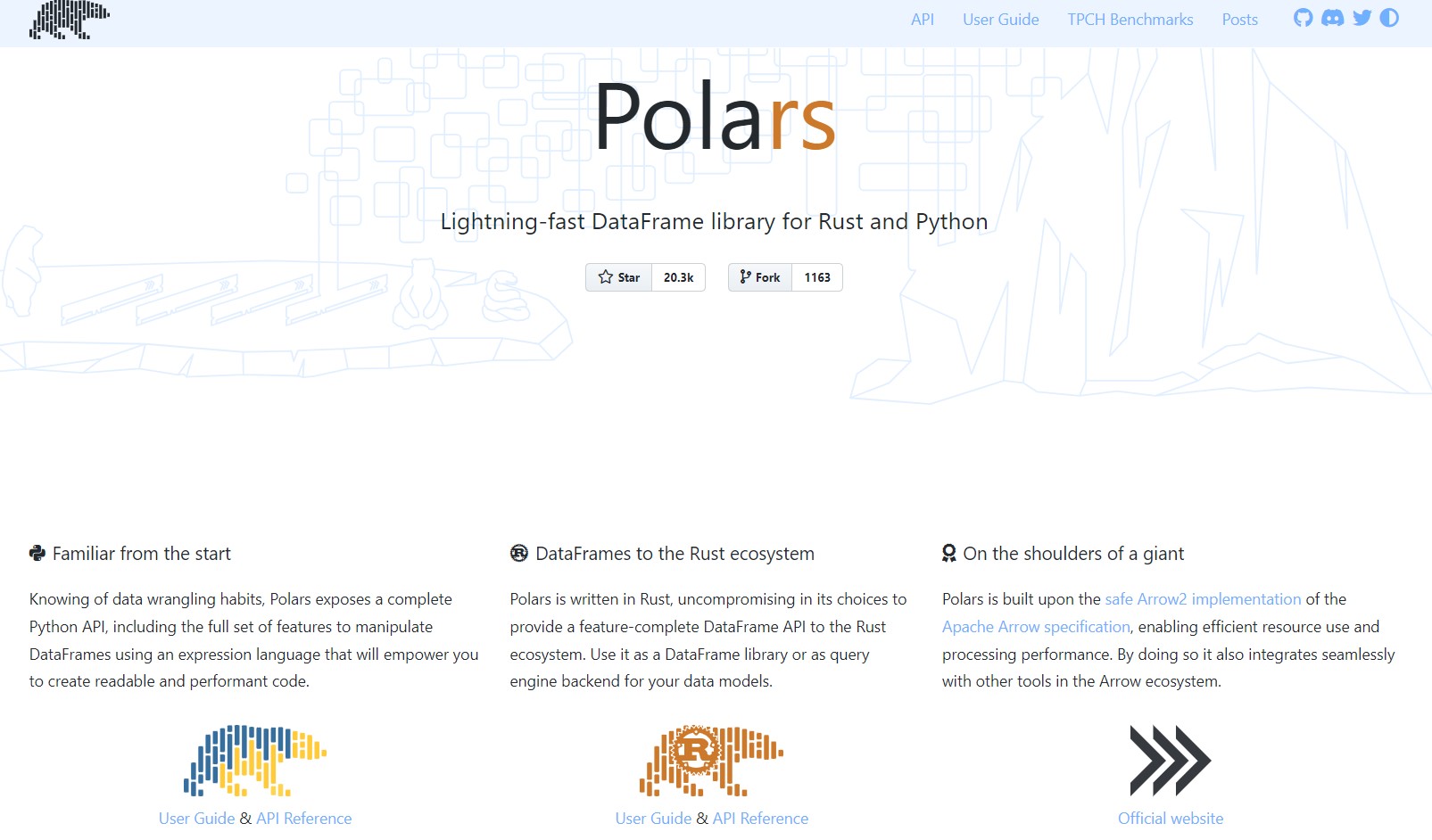
Polars

Lightning-fast DataFrame library for Rust and Python

Before we begin..

Pandas is a fast, powerful, flexible and easy to use open source data analysis and manipulation tool, built on top of the Python programming language.

  1. Pandas is slow, well yes but also, not so much if you use it the right way.
  1. Pandas 2.0 and the arrow revolution

Polars

Why is Polars faster than Pandas?

  1. Polars is written in Rust. Rust is a compiled language, Python is an interpreted language.

    • Compiled language: you generate the machine code only once then run it, subsequent runs do not need the compilation step.
    • Interpreted language: code has to be parsed, interpreted and converted into machine code every single time.
  2. Parallelization: Vectorized operations that can be executed in parallel on multiple CPU cores.

  3. Lazy evaluation: Polars supports two APIs lazy as well as eager evaluation (used by pandas). In lazy evaluation, a query is executed only when required. While in eager evaluation, a query is executed immediately.

  4. Polars uses Arrow as its in-memory representation of data. Similar to how pandas uses Numpy (although Pandas 2.0 does allow using Arrow as the backend in addition to Numpy).

    • [Excerpt from this post from Ritchie Vink, author of Polars] Arrow provides the efficient data structures and some compute kernels, like a SUM, a FILTER, a MAX etc. Arrow is not a query engine. Polars is a DataFrame library on top of arrow that has implemented efficient algorithms for JOINS, GROUPBY, PIVOTs, MELTs, QUERY OPTIMIZATION, etc. (the things you expect from a DF lib).
    • Polars could be best described as an in-memory DataFrame library with a query optimizer.

Ease of use

  1. Familiar API for users of Pandas: there are differences in syntax polars != pandas but it is still a Dataframe API making it straightforward to perform common operations such as filtering, aggregating, and joining data. See migrating from Pandas

    Reading data

    # must install s3fs -> "pip install s3fs"
    
    # Using Polars
    import polars as pl
    polars_df = pl.read_parquet("s3://nyc-tlc/trip data/yellow_tripdata_2023-06.parquet")
    
    # using Pandas
    import pandas as pd
    pandas_df = pd.read_parquet("s3://nyc-tlc/trip data/yellow_tripdata_2023-06.parquet")

    Selecting columns (see Pushdown optimization)

    # Using Polars
    selected_columns_polars = polars_df[['column1', 'column2']]
    
    # Using Pandas
    selected_columns_pandas = pandas_df[['column1', 'column2']]

Ease of use (contd.)

  1. Familiar API for users of Pandas:

    Filtering data

    # Using Polars
    filtered_polars = polars_df[polars_df['column1'] > 10]
    
    # Using Pandas
    filtered_pandas = pandas_df[pandas_df['column1'] > 10]

    Even though you can write Polars code that looks like Pandas, it is better to write idiomatic Polars code that takes advantages of unique features Polars offers.

  2. Migrating from Apache Spark: Whereas the Spark DataFrame is analogous to a collection of rows, a Polars DataFrame is closer to a collection of columns.

Installation, data loading and basic operations

Install polars via pip.

pip install polars

Import polars in your Python code and read data as usual

import polars as pl
df = pl.read_parquet("s3://nyc-tlc/trip data/yellow_tripdata_2023-06.parquet")
df.head()

shape: (5, 19)
┌──────────┬────────────┬──────────────┬──────────────┬─────┬──────────────┬──────────────┬──────────────┬─────────────┐
│ VendorID ┆ tpep_picku ┆ tpep_dropoff ┆ passenger_co ┆ ... ┆ improvement_ ┆ total_amount ┆ congestion_s ┆ Airport_fee │
---      ┆ p_datetime ┆ _datetime    ┆ unt          ┆     ┆ surcharge    ┆ ---          ┆ urcharge     ┆ ---
│ i32      ┆ ---------          ┆     ┆ ---          ┆ f64          ┆ ---          ┆ f64         │
│          ┆ datetime[n ┆ datetime[ns] ┆ i64          ┆     ┆ f64          ┆              ┆ f64          ┆             │
│          ┆ s]         ┆              ┆              ┆     ┆              ┆              ┆              ┆             │
╞══════════╪════════════╪══════════════╪══════════════╪═════╪══════════════╪══════════════╪══════════════╪═════════════╡
12023-06-012023-06-011            ┆ ... ┆ 1.033.62.50.0
│          ┆ 00:08:4800:29:41     ┆              ┆     ┆              ┆              ┆              ┆             │
12023-06-012023-06-010            ┆ ... ┆ 1.023.62.50.0
│          ┆ 00:15:0400:25:18     ┆              ┆     ┆              ┆              ┆              ┆             │
12023-06-012023-06-011            ┆ ... ┆ 1.060.050.01.75
└──────────┴────────────┴──────────────┴──────────────┴─────┴──────────────┴──────────────┴──────────────┴─────────────┘

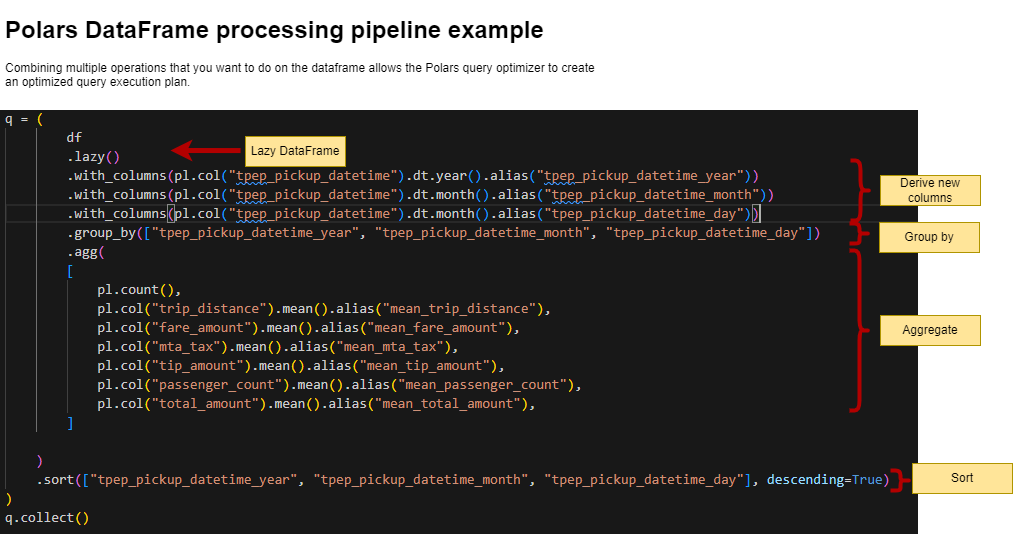
A Polars DataFrame processing pipeline example

Here is an example that we will run as part of the lab in a little bit.

Think how you would code this same pipeline in Pandas…

Polars pipeline

Polars pipeline

Lazy vs Eager Evaluation

Motivation: The Performance Problem

Scenario: Analyzing Customer Data

import pandas as pd

# Load 10 GB of customer data
customers = pd.read_csv("customers.csv")  # Takes 45 seconds

# Filter for active customers
active = customers[customers['status'] == 'active']  # 30 seconds

# Select relevant columns
subset = active[['id', 'revenue', 'region']]  # 15 seconds

# Calculate regional averages
result = subset.groupby('region')['revenue'].mean()  # 20 seconds

# Total time: 110 seconds

Question: Could we do better?

The Eager Evaluation Problem

Execution Flow

Code
graph TB
    Start[Start] --> Read[Read entire CSV<br/>10 GB in memory]
    Read --> Filter[Filter rows<br/>Create new DataFrame 6 GB]
    Filter --> Select[Select columns<br/>Create new DataFrame 2 GB]
    Select --> Group[Group and aggregate<br/>Final result]
    Group --> End[End]
    
    Read -.->|Peak Memory| Mem1[10 GB]
    Filter -.->|Peak Memory| Mem2[16 GB total]
    Select -.->|Peak Memory| Mem3[18 GB total]
    
    style Read fill:#ff6b6b,stroke:#c92a2a,stroke-width:2px,color:#fff
    style Filter fill:#ff6b6b,stroke:#c92a2a,stroke-width:2px,color:#fff
    style Select fill:#ff6b6b,stroke:#c92a2a,stroke-width:2px,color:#fff
    style Group fill:#ffa94d,stroke:#e67700,stroke-width:2px,color:#fff
graph TB
    Start[Start] --> Read[Read entire CSV<br/>10 GB in memory]
    Read --> Filter[Filter rows<br/>Create new DataFrame 6 GB]
    Filter --> Select[Select columns<br/>Create new DataFrame 2 GB]
    Select --> Group[Group and aggregate<br/>Final result]
    Group --> End[End]
    
    Read -.->|Peak Memory| Mem1[10 GB]
    Filter -.->|Peak Memory| Mem2[16 GB total]
    Select -.->|Peak Memory| Mem3[18 GB total]
    
    style Read fill:#ff6b6b,stroke:#c92a2a,stroke-width:2px,color:#fff
    style Filter fill:#ff6b6b,stroke:#c92a2a,stroke-width:2px,color:#fff
    style Select fill:#ff6b6b,stroke:#c92a2a,stroke-width:2px,color:#fff
    style Group fill:#ffa94d,stroke:#e67700,stroke-width:2px,color:#fff
Problem: Each operation executes immediately and creates intermediate results

Enter Lazy Evaluation

The Same Pipeline, Reimagined

import polars as pl

# Build execution plan (no computation yet)
result = (pl.scan_csv("customers.csv")           # 0.001 seconds
    .filter(pl.col('status') == 'active')        # 0.001 seconds
    .select(['id', 'revenue', 'region'])         # 0.001 seconds
    .groupby('region')
    .agg(pl.col('revenue').mean())
    .collect())                                   # 12 seconds

# Total time: 12 seconds

Key Insight: Operations are planned first, then executed optimally

Lazy Evaluation Flow

Code
graph TB
    Start[Start] --> Plan1[Build Plan: Scan CSV]
    Plan1 --> Plan2[Build Plan: Filter]
    Plan2 --> Plan3[Build Plan: Select]
    Plan3 --> Plan4[Build Plan: GroupBy]
    Plan4 --> Optimize[Query Optimizer]
    
    Optimize --> Exec[Optimized Execution:<br/>Single Pass<br/>Streaming]
    Exec --> End[Result]
    
    Optimize -.->|Pushdown| Push1[Filter at source]
    Optimize -.->|Pushdown| Push2[Select only needed columns]
    Optimize -.->|Fusion| Fuse[Combine operations]
    
    style Plan1 fill:#e3f2fd,stroke:#1976d2,stroke-width:2px
    style Plan2 fill:#e3f2fd,stroke:#1976d2,stroke-width:2px
    style Plan3 fill:#e3f2fd,stroke:#1976d2,stroke-width:2px
    style Plan4 fill:#e3f2fd,stroke:#1976d2,stroke-width:2px
    style Optimize fill:#fff3e0,stroke:#f57c00,stroke-width:3px
    style Exec fill:#c8e6c9,stroke:#388e3c,stroke-width:2px,color:#000

graph TB
    Start[Start] --> Plan1[Build Plan: Scan CSV]
    Plan1 --> Plan2[Build Plan: Filter]
    Plan2 --> Plan3[Build Plan: Select]
    Plan3 --> Plan4[Build Plan: GroupBy]
    Plan4 --> Optimize[Query Optimizer]
    
    Optimize --> Exec[Optimized Execution:<br/>Single Pass<br/>Streaming]
    Exec --> End[Result]
    
    Optimize -.->|Pushdown| Push1[Filter at source]
    Optimize -.->|Pushdown| Push2[Select only needed columns]
    Optimize -.->|Fusion| Fuse[Combine operations]
    
    style Plan1 fill:#e3f2fd,stroke:#1976d2,stroke-width:2px
    style Plan2 fill:#e3f2fd,stroke:#1976d2,stroke-width:2px
    style Plan3 fill:#e3f2fd,stroke:#1976d2,stroke-width:2px
    style Plan4 fill:#e3f2fd,stroke:#1976d2,stroke-width:2px
    style Optimize fill:#fff3e0,stroke:#f57c00,stroke-width:3px
    style Exec fill:#c8e6c9,stroke:#388e3c,stroke-width:2px,color:#000

Key Concepts: Computation Graph (DAG)

Lazy Evaluation Builds a Directed Acyclic Graph

Code
graph TB
    Result[Result DataFrame]
    GroupBy[GroupBy Operation<br/>groupby 'region'<br/>agg mean 'revenue']
    Select[Select Operation<br/>columns: id, revenue, region]
    Filter[Filter Operation<br/>status == 'active']
    Scan[Scan Operation<br/>customers.csv]
    
    Result --> GroupBy
    GroupBy --> Select
    Select --> Filter
    Filter --> Scan
    
    style Result fill:#c8e6c9,stroke:#388e3c,stroke-width:2px
    style GroupBy fill:#e3f2fd,stroke:#1976d2,stroke-width:2px
    style Select fill:#e3f2fd,stroke:#1976d2,stroke-width:2px
    style Filter fill:#e3f2fd,stroke:#1976d2,stroke-width:2px
    style Scan fill:#fff3e0,stroke:#f57c00,stroke-width:2px

graph TB
    Result[Result DataFrame]
    GroupBy[GroupBy Operation<br/>groupby 'region'<br/>agg mean 'revenue']
    Select[Select Operation<br/>columns: id, revenue, region]
    Filter[Filter Operation<br/>status == 'active']
    Scan[Scan Operation<br/>customers.csv]
    
    Result --> GroupBy
    GroupBy --> Select
    Select --> Filter
    Filter --> Scan
    
    style Result fill:#c8e6c9,stroke:#388e3c,stroke-width:2px
    style GroupBy fill:#e3f2fd,stroke:#1976d2,stroke-width:2px
    style Select fill:#e3f2fd,stroke:#1976d2,stroke-width:2px
    style Filter fill:#e3f2fd,stroke:#1976d2,stroke-width:2px
    style Scan fill:#fff3e0,stroke:#f57c00,stroke-width:2px

Directed Acyclic Graph (DAG): Represents dependencies between operations

Query Optimization: The Power of Lazy

Optimization Techniques

Code
mindmap
  root((Query<br/>Optimization))
    Pushdown
      Predicate Pushdown
        Move filters to source
        Skip irrelevant data
      Projection Pushdown
        Read only needed columns
        Reduce I/O
      Partition Pruning
        Skip entire partitions
        Metadata-based filtering
    Fusion
      Operation Fusion
        Combine multiple ops
        Single pass execution
      Filter Fusion
        Merge multiple filters
        Reduce overhead
    Reordering
      Join Reordering
        Optimize join order
        Minimize intermediates
      Predicate Reordering
        Most selective first
        Early reduction
    Elimination
      Common Subexpression
        Reuse computed values
        Avoid redundancy
      Constant Folding
        Pre-compute constants
        Simplify expressions

mindmap
  root((Query<br/>Optimization))
    Pushdown
      Predicate Pushdown
        Move filters to source
        Skip irrelevant data
      Projection Pushdown
        Read only needed columns
        Reduce I/O
      Partition Pruning
        Skip entire partitions
        Metadata-based filtering
    Fusion
      Operation Fusion
        Combine multiple ops
        Single pass execution
      Filter Fusion
        Merge multiple filters
        Reduce overhead
    Reordering
      Join Reordering
        Optimize join order
        Minimize intermediates
      Predicate Reordering
        Most selective first
        Early reduction
    Elimination
      Common Subexpression
        Reuse computed values
        Avoid redundancy
      Constant Folding
        Pre-compute constants
        Simplify expressions

Optimization Example: Predicate Pushdown

Code
graph TB
    subgraph "Without Optimization (Eager)"
        E1[Read ALL data<br/>10 GB, 50 columns]
        E2[Filter in memory<br/>year == 2025]
        E3[Result: 1 GB]
        E1 --> E2 --> E3
    end
    
    subgraph "With Optimization (Lazy)"
        L1[Read with filter<br/>Only year == 2025<br/>1 GB, 50 columns]
        L2[Result: 1 GB]
        L1 --> L2
    end
    
    style E1 fill:#ff6b6b,stroke:#c92a2a,stroke-width:2px,color:#fff
    style E2 fill:#ff6b6b,stroke:#c92a2a,stroke-width:2px,color:#fff
    style L1 fill:#51cf66,stroke:#2f9e44,stroke-width:2px,color:#fff
    style L2 fill:#51cf66,stroke:#2f9e44,stroke-width:2px,color:#fff

graph TB
    subgraph "Without Optimization (Eager)"
        E1[Read ALL data<br/>10 GB, 50 columns]
        E2[Filter in memory<br/>year == 2025]
        E3[Result: 1 GB]
        E1 --> E2 --> E3
    end
    
    subgraph "With Optimization (Lazy)"
        L1[Read with filter<br/>Only year == 2025<br/>1 GB, 50 columns]
        L2[Result: 1 GB]
        L1 --> L2
    end
    
    style E1 fill:#ff6b6b,stroke:#c92a2a,stroke-width:2px,color:#fff
    style E2 fill:#ff6b6b,stroke:#c92a2a,stroke-width:2px,color:#fff
    style L1 fill:#51cf66,stroke:#2f9e44,stroke-width:2px,color:#fff
    style L2 fill:#51cf66,stroke:#2f9e44,stroke-width:2px,color:#fff

Benefit: 10x less data read from disk/network

Optimization Example: Projection Pushdown

Code
graph LR
    subgraph "Without Optimization"
        W1[Read 50 columns<br/>5 GB total]
        W2[Select 2 columns<br/>Still read 5 GB]
        W3[Result: 200 MB]
        W1 --> W2 --> W3
    end
    
    subgraph "With Optimization"
        O1[Read 2 columns only<br/>200 MB total]
        O2[Result: 200 MB]
        O1 --> O2
    end
    
    style W1 fill:#ff6b6b,stroke:#c92a2a,stroke-width:2px,color:#fff
    style W2 fill:#ff6b6b,stroke:#c92a2a,stroke-width:2px,color:#fff
    style O1 fill:#51cf66,stroke:#2f9e44,stroke-width:2px,color:#fff
    style O2 fill:#51cf66,stroke:#2f9e44,stroke-width:2px,color:#fff

graph LR
    subgraph "Without Optimization"
        W1[Read 50 columns<br/>5 GB total]
        W2[Select 2 columns<br/>Still read 5 GB]
        W3[Result: 200 MB]
        W1 --> W2 --> W3
    end
    
    subgraph "With Optimization"
        O1[Read 2 columns only<br/>200 MB total]
        O2[Result: 200 MB]
        O1 --> O2
    end
    
    style W1 fill:#ff6b6b,stroke:#c92a2a,stroke-width:2px,color:#fff
    style W2 fill:#ff6b6b,stroke:#c92a2a,stroke-width:2px,color:#fff
    style O1 fill:#51cf66,stroke:#2f9e44,stroke-width:2px,color:#fff
    style O2 fill:#51cf66,stroke:#2f9e44,stroke-width:2px,color:#fff

Benefit: 25x less data read (columnar format)

Lazy Evaluation in Practice: Polars

Eager API

import polars as pl

# Eager: Immediate execution
df = pl.read_csv("data.csv")                    # Executes
filtered = df.filter(pl.col('value') > 100)     # Executes
result = filtered.select(['id', 'value'])       # Executes

# Each operation creates materialized DataFrame

Lazy API

# Lazy: Deferred execution
lazy_df = pl.scan_csv("data.csv")               # Plan only
filtered = lazy_df.filter(pl.col('value') > 100)  # Plan only
result = filtered.select(['id', 'value'])       # Plan only

# Nothing executed yet!

# Trigger execution
materialized = result.collect()  # Optimized execution

Streaming Execution

Processing Larger-than-Memory Data

Code
graph TB
    File[File: 100 GB]
    
    File --> C1[Chunk 1: 100 MB]
    File --> C2[Chunk 2: 100 MB]
    File --> C3[Chunk 3: 100 MB]
    File --> CN[Chunk N: 100 MB]
    
    C1 --> P1[Process:<br/>Filter → Select → Partial Agg]
    C2 --> P2[Process:<br/>Filter → Select → Partial Agg]
    C3 --> P3[Process:<br/>Filter → Select → Partial Agg]
    CN --> PN[Process:<br/>Filter → Select → Partial Agg]
    
    P1 --> Combine[Combine Partial Results]
    P2 --> Combine
    P3 --> Combine
    PN --> Combine
    
    Combine --> Final[Final Result]
    
    style File fill:#e3f2fd,stroke:#1976d2,stroke-width:2px
    style C1 fill:#fff3e0,stroke:#f57c00,stroke-width:2px
    style C2 fill:#fff3e0,stroke:#f57c00,stroke-width:2px
    style C3 fill:#fff3e0,stroke:#f57c00,stroke-width:2px
    style CN fill:#fff3e0,stroke:#f57c00,stroke-width:2px
    style Combine fill:#c8e6c9,stroke:#388e3c,stroke-width:2px
    style Final fill:#4caf50,stroke:#2e7d32,stroke-width:3px,color:#fff

graph TB
    File[File: 100 GB]
    
    File --> C1[Chunk 1: 100 MB]
    File --> C2[Chunk 2: 100 MB]
    File --> C3[Chunk 3: 100 MB]
    File --> CN[Chunk N: 100 MB]
    
    C1 --> P1[Process:<br/>Filter → Select → Partial Agg]
    C2 --> P2[Process:<br/>Filter → Select → Partial Agg]
    C3 --> P3[Process:<br/>Filter → Select → Partial Agg]
    CN --> PN[Process:<br/>Filter → Select → Partial Agg]
    
    P1 --> Combine[Combine Partial Results]
    P2 --> Combine
    P3 --> Combine
    PN --> Combine
    
    Combine --> Final[Final Result]
    
    style File fill:#e3f2fd,stroke:#1976d2,stroke-width:2px
    style C1 fill:#fff3e0,stroke:#f57c00,stroke-width:2px
    style C2 fill:#fff3e0,stroke:#f57c00,stroke-width:2px
    style C3 fill:#fff3e0,stroke:#f57c00,stroke-width:2px
    style CN fill:#fff3e0,stroke:#f57c00,stroke-width:2px
    style Combine fill:#c8e6c9,stroke:#388e3c,stroke-width:2px
    style Final fill:#4caf50,stroke:#2e7d32,stroke-width:3px,color:#fff

Peak Memory: ~500 MB (chunk + partials) instead of 100 GB

Streaming Execution Code

import polars as pl

# Process 100 GB file with 8 GB RAM
result = (pl.scan_parquet("huge_file.parquet")
    .filter(pl.col('year') == 2025)
    .groupby('category')
    .agg(pl.col('revenue').sum())
    .collect(streaming=True))  # ← Streaming mode

# Data processed in chunks, never fully materialized

How it works:

  1. Read chunk of data (e.g., 100 MB)
  2. Apply filter, select, partial aggregation
  3. Discard processed chunk
  4. Repeat until complete
  5. Combine partial aggregations

When to Use Eager Evaluation

Decision Tree

Code
graph TD
    Start{Evaluate<br/>Requirements}
    
    Start -->|Small data| Size{Dataset size?}
    Size -->|< 100 MB| Eager1[Use Eager]
    Size -->| ≥ 100 MB| Next1{Pipeline complexity?}
    
    Start -->|Interactive| Context{Context?}
    Context -->|Exploration| Eager2[Use Eager]
    Context -->|Production| Next2{Memory constraints?}
    
    Next1 -->|Simple 1-2 ops| Eager3[Use Eager]
    Next1 -->|Complex 3+ ops| Lazy1[Use Lazy]
    
    Next2 -->|Abundant RAM| Maybe[Consider Eager]
    Next2 -->|Limited RAM| Lazy2[Use Lazy]
    
    style Eager1 fill:#51cf66,stroke:#2f9e44,stroke-width:2px,color:#fff
    style Eager2 fill:#51cf66,stroke:#2f9e44,stroke-width:2px,color:#fff
    style Eager3 fill:#51cf66,stroke:#2f9e44,stroke-width:2px,color:#fff
    style Lazy1 fill:#667eea,stroke:#2c3e50,stroke-width:2px,color:#fff
    style Lazy2 fill:#667eea,stroke:#2c3e50,stroke-width:2px,color:#fff

graph TD
    Start{Evaluate<br/>Requirements}
    
    Start -->|Small data| Size{Dataset size?}
    Size -->|< 100 MB| Eager1[Use Eager]
    Size -->| ≥ 100 MB| Next1{Pipeline complexity?}
    
    Start -->|Interactive| Context{Context?}
    Context -->|Exploration| Eager2[Use Eager]
    Context -->|Production| Next2{Memory constraints?}
    
    Next1 -->|Simple 1-2 ops| Eager3[Use Eager]
    Next1 -->|Complex 3+ ops| Lazy1[Use Lazy]
    
    Next2 -->|Abundant RAM| Maybe[Consider Eager]
    Next2 -->|Limited RAM| Lazy2[Use Lazy]
    
    style Eager1 fill:#51cf66,stroke:#2f9e44,stroke-width:2px,color:#fff
    style Eager2 fill:#51cf66,stroke:#2f9e44,stroke-width:2px,color:#fff
    style Eager3 fill:#51cf66,stroke:#2f9e44,stroke-width:2px,color:#fff
    style Lazy1 fill:#667eea,stroke:#2c3e50,stroke-width:2px,color:#fff
    style Lazy2 fill:#667eea,stroke:#2c3e50,stroke-width:2px,color:#fff

Eager Evaluation Advantages

Code
mindmap
  root((Eager<br/>Evaluation))
    Simplicity
      Immediate feedback
      Easy debugging
      What you see is what you get
      Step-by-step execution
    Interactivity
      Jupyter notebooks
      REPL environments
      Quick exploration
      Instant results
    Small Data
      Low overhead
      No optimization needed
      Fast for < 100 MB
      Simple operations
    Stateful Operations
      Maintain state
      Inspect intermediates
      Conditional logic
      Complex dependencies

mindmap
  root((Eager<br/>Evaluation))
    Simplicity
      Immediate feedback
      Easy debugging
      What you see is what you get
      Step-by-step execution
    Interactivity
      Jupyter notebooks
      REPL environments
      Quick exploration
      Instant results
    Small Data
      Low overhead
      No optimization needed
      Fast for < 100 MB
      Simple operations
    Stateful Operations
      Maintain state
      Inspect intermediates
      Conditional logic
      Complex dependencies

When to Use Lazy Evaluation

Use Case Matrix

Code
quadrantChart
    title Lazy vs Eager Evaluation: Use Case Matrix
    x-axis Low Complexity --> High Complexity
    y-axis Small Data --> Large Data
    quadrant-1 Lazy Ideal
    quadrant-2 Lazy Beneficial
    quadrant-3 Either Works
    quadrant-4 Eager Sufficient
    Small exploration: [0.3, 0.2]
    Simple ETL: [0.4, 0.5]
    Complex analytics: [0.7, 0.8]
    ML feature engineering: [0.8, 0.9]
    Production pipelines: [0.85, 0.85]
    Interactive notebook: [0.2, 0.3]
    Data quality checks: [0.5, 0.7]

quadrantChart
    title Lazy vs Eager Evaluation: Use Case Matrix
    x-axis Low Complexity --> High Complexity
    y-axis Small Data --> Large Data
    quadrant-1 Lazy Ideal
    quadrant-2 Lazy Beneficial
    quadrant-3 Either Works
    quadrant-4 Eager Sufficient
    Small exploration: [0.3, 0.2]
    Simple ETL: [0.4, 0.5]
    Complex analytics: [0.7, 0.8]
    ML feature engineering: [0.8, 0.9]
    Production pipelines: [0.85, 0.85]
    Interactive notebook: [0.2, 0.3]
    Data quality checks: [0.5, 0.7]

Lazy Evaluation Advantages

Code
mindmap
  root((Lazy<br/>Evaluation))
    Performance
      Query optimization
      Predicate pushdown
      Projection pushdown
      Operation fusion
    Scalability
      Streaming execution
      Larger-than-memory
      Cloud-native
      Minimal data transfer
    Efficiency
      Memory efficient
      Parallel execution
      Reduced I/O
      Single pass processing
    Production
      Predictable performance
      Reproducible results
      Resource optimization
      Cost effective

mindmap
  root((Lazy<br/>Evaluation))
    Performance
      Query optimization
      Predicate pushdown
      Projection pushdown
      Operation fusion
    Scalability
      Streaming execution
      Larger-than-memory
      Cloud-native
      Minimal data transfer
    Efficiency
      Memory efficient
      Parallel execution
      Reduced I/O
      Single pass processing
    Production
      Predictable performance
      Reproducible results
      Resource optimization
      Cost effective

Further reading

DuckDB

An in-process SQL OLAP database management system

DuckDB

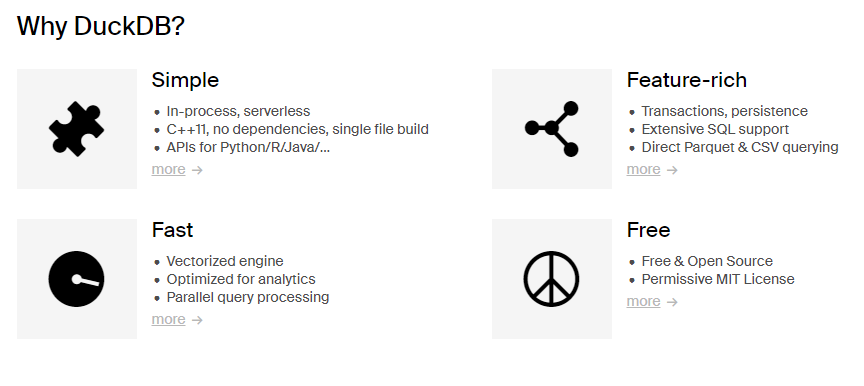
  1. DuckDB is an in-process SQL OLAP database management system.

It is like sqllite, but for analytics. What does this mean? It means that your database runs inside your process, there are no servers to manage, no remote system to connect to. Very snappy, easy to experiment with SQL like syntax.

  1. DuckDB does vectorized processing i.e. loads chunks of data into memory (tries to keep everything in the CPU’s L1 and L2 cache) and is thus able to handle datasets bigger than the amount of RAM available.

  2. DuckDB supports Python, R and a host of other languages.

DuckDB - quick introduction

DuckDB is an in-process SQL OLAP database management system

pip install duckdb

Duck DB

Duck DB

Key Features

  1. Columnar Storage & Vectorized Query processing: DuckDB contains a columnar-vectorized query execution engine, where queries are still interpreted, but a large batch of values (a “vector”) are processed in one operation.

    • Most analytical queries (think group by and summarize) or even data retrieval for training ML models require retrieving a subset of columns and now the entire row, columnar storage make this faster.
  2. In-Memory Processing: all data needed for processing is brought within the process memory (recall that columnar storage format helps with this) making the queries run faster (no call to a database over the network).

  3. SQL Support: highly Postgres-compatible version of SQL1.

  4. ACID Compliance: Transactional guarantees (ACID properties) through bulk-optimized Multi-Version Concurrency Control (MVCC).

Use-cases for DuckDB

  1. Data Warehousing
  2. Business Intelligence
  3. Real-time Analytics
  4. IoT Data Processing

DuckDB in the wild

  1. How We Silently Switched Mode’s In-Memory Data Engine to DuckDB To Boost Visual Data Exploration Speed

  2. Why we built Rill with DuckDB

  3. Leveraging DuckDB for enhanced performance in dbt projects

How might you think about DuckDB - DIY Version

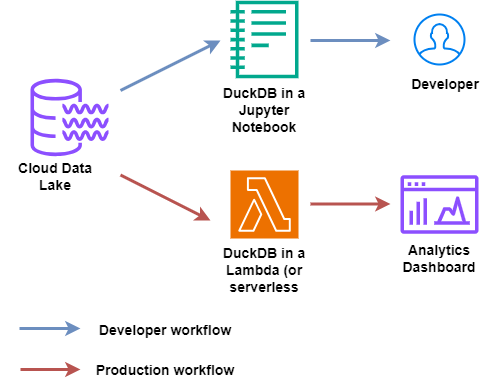
Datalake and DuckDB

Datalake and DuckDB
  1. Using DuckDB in AWS Lambda

  2. Modern Data Stack in a Box with DuckDB: DuckDB, Meltano, Dbt, Apache Superset

How might you think about DuckDB - Fully-managed

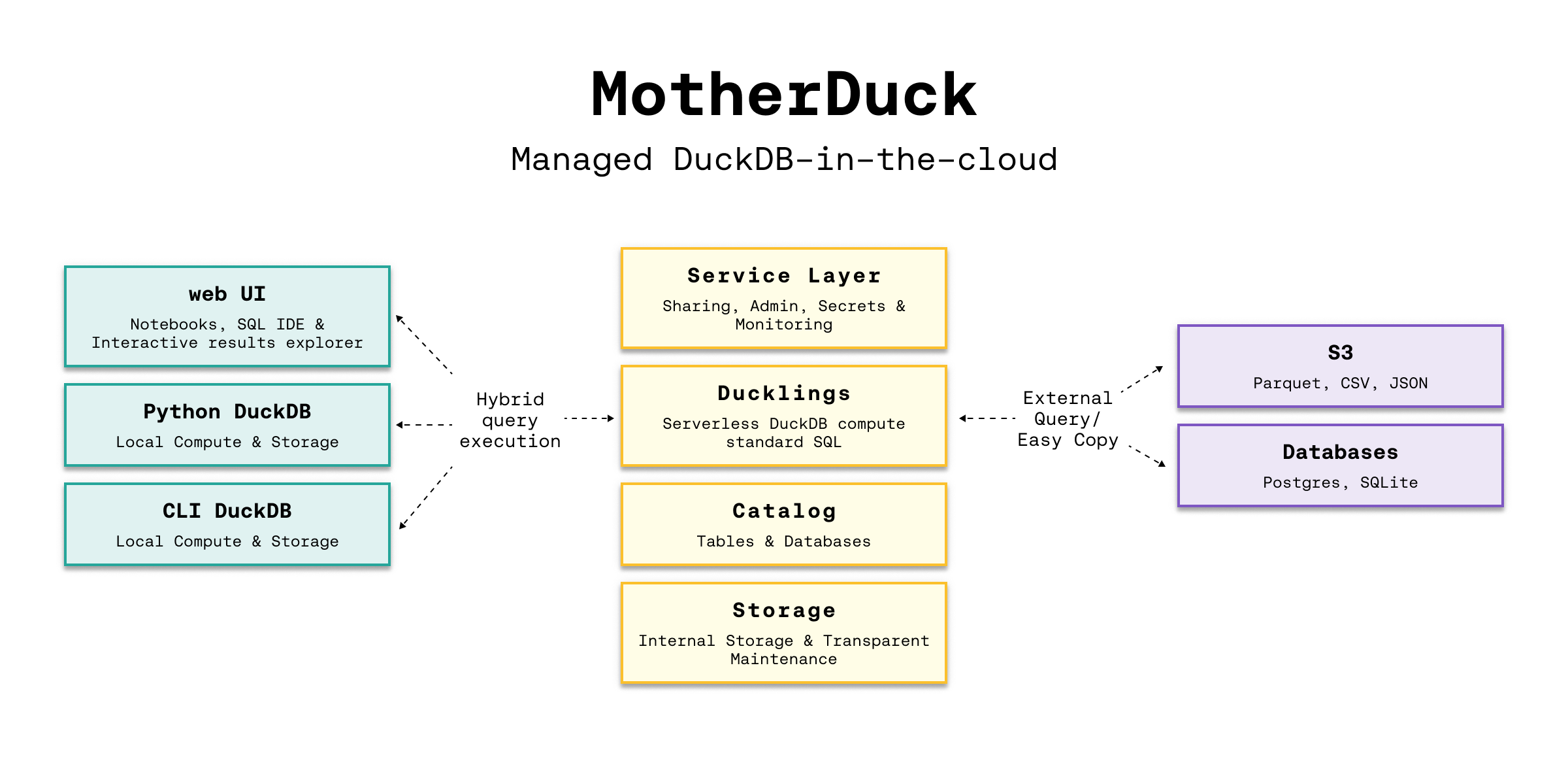
MotherDuck Architecture

MotherDuck Architecture
  1. Architecture and capabilities

  2. Seamlessly analyze data, whether it sits on your laptop, in the cloud or split between. Hybrid execution automatically plans each part of your query and determines where it’s best computed. If you use DuckDB with data lakes in s3, it’ll be much faster to run your analyses on MotherDuck.

DuckDB Vs MotherDuck

Setting Up DuckDB

  1. Configuration and Initialization: DuckDB is deeply integrated into Python and R for efficient interactive data analysis. DuckDB provides APIs for Java, C, C++, Julia, Swift, and others.

    pip install duckdb
    # OR
    conda install python-duckdb -c conda-forge
  2. Connecting to DuckDB

    import duckdb
    # directly query a Pandas DataFrame
    import pandas as pd
    df = pd.read_csv("https://raw.githubusercontent.com/anly503/datasets/main/EconomistData.csv")
    duckdb.sql('SELECT * FROM df')

Setting Up DuckDB (contd.)

  1. Supported data formats: DuckDB can ingest data from a wide variety of formats – both on-disk and in-memory. See the data ingestion page for more information.

    import duckdb
    duckdb.read_csv('example.csv')                # read a CSV file into a Relation
    duckdb.read_parquet('example.parquet')        # read a Parquet file into a Relation
    duckdb.read_json('example.json')              # read a JSON file into a Relation
    
    duckdb.sql('SELECT * FROM "example.csv"')     # directly query a CSV file
    duckdb.sql('SELECT * FROM "example.parquet"') # directly query a Parquet file
    duckdb.sql('SELECT * FROM "example.json"')    # directly query a JSON file

Querying DuckDB

Essential reading: Friendlier SQL with DuckDB, SQL Introduction

Basic SQL Queries:

import duckdb
import pandas as pd
babynames = pd.read_parquet("https://github.com/anly503/datasets/raw/main/babynames.parquet.zstd")
duckdb.sql("select count(*)  from babynames where Name='John'")

Aggregations and Grouping

duckdb.sql("select State, Name, count(*) as count  from babynames group by State, Name order by State desc, count desc") 

Querying DuckDB (contd.)

Essential reading: From & Join clauses

Joins and Subqueries

# -- join two tables together
duckdb.sql("SELECT * FROM table_name JOIN other_table ON (table_name.key = other_table.key")

Window Functions

powerplants = pd.read_csv("https://raw.githubusercontent.com/anly503/datasets/main/powerplants.csv", parse_dates=["date"])
q = """
SELECT "plant", "date",
    AVG("MWh") OVER (
        PARTITION BY "plant"
        ORDER BY "date" ASC
        RANGE BETWEEN INTERVAL 3 DAYS PRECEDING
                  AND INTERVAL 3 DAYS FOLLOWING)
        AS "MWh 7-day Moving Average"
FROM powerplants
ORDER BY 1, 2;
"""
duckdb.sql(q)

Using the DuckDB CLI & Shell

  1. Install the DuckDB CLI (download link) OR use it in your browser via shell.duckdb.org/ for easy data exploration using just SQL.

  2. Once installed you can import a local file into the shell and run queries.

    • You can download powerplants.csv from here.
C:\Users\<username>\Downloads\duckdb_cli-windows-amd64>duckdb
v0.8.1 6536a77232
Enter ".help" for usage hints.
Connected to a transient in-memory database.
Use ".open FILENAME" to reopen on a persistent database.
D CREATE TABLE powerplants AS SELECT * FROM read_csv_auto('powerplants.csv');
D DESCRIBE powerplants;
┌─────────────┬─────────────┬─────────┬─────────┬─────────┬───────┐
│ column_name │ column_type │  null   │   key   │ default │ extra │
│   varchar   │   varchar   │ varchar │ varchar │ varchar │ int32 │
├─────────────┼─────────────┼─────────┼─────────┼─────────┼───────┤
│ plant       │ VARCHAR     │ YES     │         │         │       │
│ date        │ DATE        │ YES     │         │         │       │
│ MWh         │ BIGINT      │ YES     │         │         │       │
└─────────────┴─────────────┴─────────┴─────────┴─────────┴───────┘
D  SELECT * from powerplants where plant='Boston' and date='2019-01-02';
┌─────────┬────────────┬────────┐
│  plant  │    date    │  MWh   │
│ varchar │    date    │ int64  │
├─────────┼────────────┼────────┤
│ Boston  │ 2019-01-02564337
└─────────┴────────────┴────────┘
D

Profiling in DuckDB

  1. Query Optimization: Use the EXPLAIN & ANALYZE keywords to understand how your query is being executed (see Query Plan and the time being spent in individual steps of your query.

    D EXPLAIN ANALYZE SELECT * from powerplants where plant='Boston' and date='2019-01-02';
  2. DuckDB will use all the cores available on the underlying compute, but you can adjust it (scenario: your process is not the only application on that VM, you want to limit the amount of resources it gets). Full configuration available here.

    D select current_setting('threads');
    ┌────────────────────────────┐
    │ current_setting('threads') │
    │           int64            │
    ├────────────────────────────┤
    │                          8 │
    └────────────────────────────┘
    D SET threads=4;
    D select current_setting('threads');
    ┌────────────────────────────┐
    │ current_setting('threads') │
    │           int64            │
    ├────────────────────────────┤
    │                          4 │
    └────────────────────────────┘
    D

Benchmarks and Comparisons

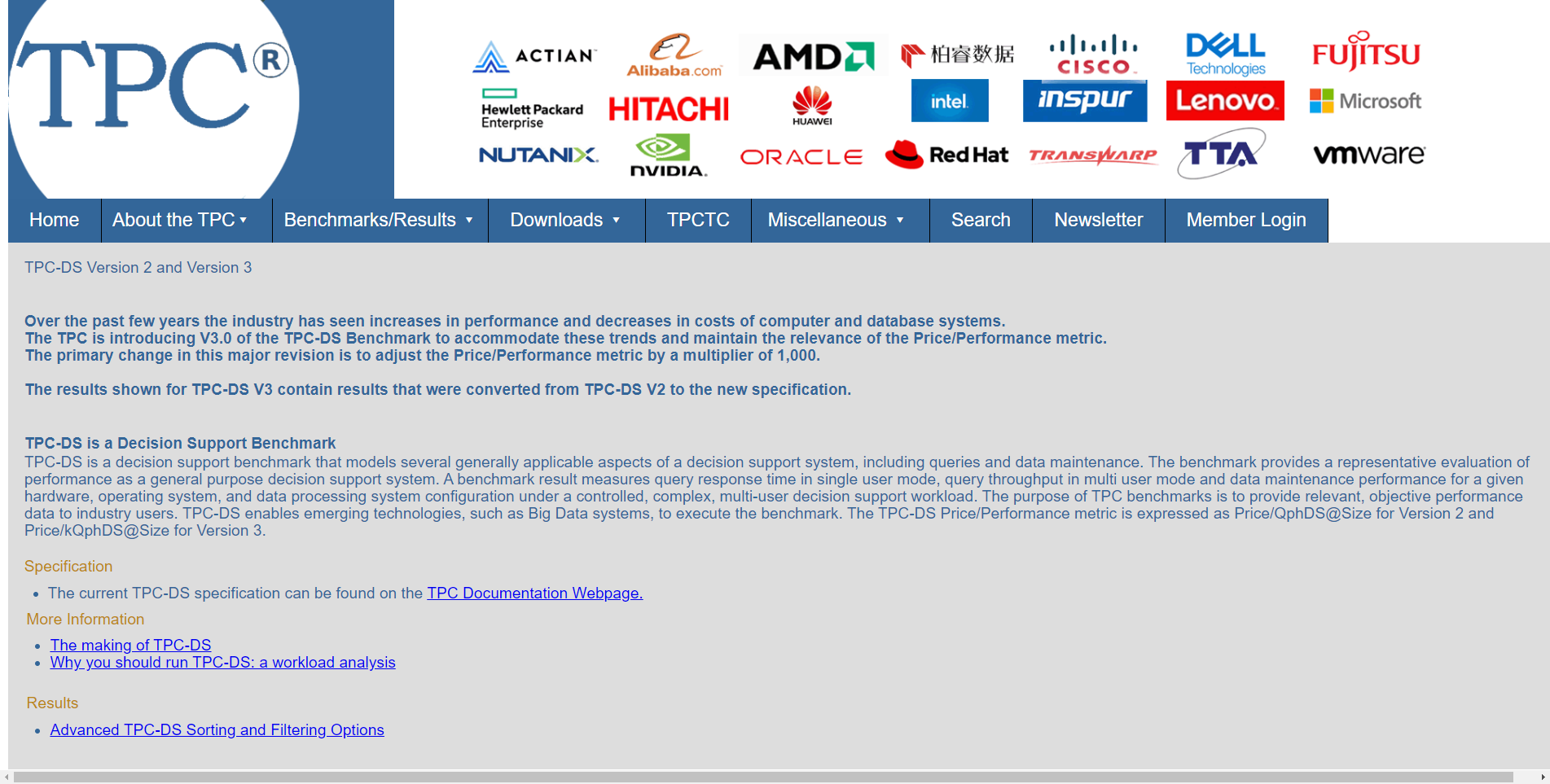
  1. This is a tricky topic, in general, you can make your choosen solution look better by focussing on metrics on which your choosen solution provides better results.
    • In general, TPC-H and TPC-DS are considered the standard benchmarks for data processing.
  2. Some links to explore further:

TPC-DS

TPC-DS

A simple example of using DuckDB and Apache Arrow using NYC Taxi dataset

This notebook reads the NYC taxi dataset files for the year 2021 (about ~29 million rows) and runs some analytics operation on this dataset. This dataset is too big to fit into memory.

  1. We read the data from S3 using apache Arrow (pyarrow).

  2. The zero-copy integration between DuckDB and Apache Arrow allows for rapid analysis of larger than memory datasets in Python and R using either SQL or relational APIs.

  3. We create a DuckDB instance in memory and using the connection to this in-memory database We run some simple analytics operations using SQL syntax.

Also see https://duckdb.org/2021/12/03/duck-arrow.html

Further reading

  1. Parallel Grouped Aggregation in DuckDB
  2. Meta queries
  3. Profiling queries in DuckDB
  4. DuckDB tutorial for beginners
  5. DuckDB CLI API
  6. Using DuckDB in AWS Lambda
  7. Revisiting the Poor Man’s Data Lake with MotherDuck
  8. Supercharge your data processing with DuckDB
  9. Friendlier SQL with DuckDB
  10. Building and deploying data apps with DuckDB and Streamlit

GitHub Classroom

GitHub Classroom Link