Lecture 6
Parallel and distributed computing using Ray
Looking Back
- Parallelization
- Cloud infrastructure
- Polars, DuckDB
Future
- Apache Spark and components
- Project
Today
- Ray
Reviewing Prior Topics
AWS Academy
- Credit limit - $50
I will provide a new classroom if you run out of credits or > $45 used
Note that you will have to repeat several setup steps:
- security group
- EC2 keypair uploading (the AWS part only)
- sagemaker setup
- any S3 uploading or copying as well as bucket creation as necessary
- EMR configuration
Ray

Ray is an open-source unified compute framework that makes it easy to scale AI and Python workloads — from reinforcement learning to deep learning to tuning, and model serving. Learn more about Ray’s rich set of libraries and integrations.
Why do we need Ray?
To scale any Python workload from laptop to cloud
Allows an infrastructure for easy parallelization on the cloud, allowing scaling of compute
Ray Initialization — ray.init()
```{python}
import ray

# Local mode (single machine — what you'll use on your EC2)
ray.init()

# Check what resources Ray detected
print(ray.available_resources())
# → {'CPU': 2.0, 'memory': 7516192768.0, ...}  on t3.large

# Cluster mode (connect to an existing Ray head node)
# ray.init(address="ray://HEAD_IP:10001")

# Safe re-run in notebooks
ray.init(ignore_reinit_error=True)

# Always shut down when done
ray.shutdown()
```Ray Cluster Architecture
Head Node
- Global Control Store (GCS) — cluster state
- Raylet — local task scheduling
- Dashboard server — web UI (port 8265)
- Driver process — your Python script
Worker Nodes (0–N)
- Raylet — accepts tasks from head
- Object Store — shared memory per node
- Worker processes — run tasks & actors
┌─────────────────────────────────┐
│          HEAD NODE              │
│  ┌─────────────────────────┐   │
│  │ GCS │ Dashboard │ Driver │   │
│  └─────────────────────────┘   │
│  ┌──────────┐ ┌─────────────┐  │
│  │  Raylet  │ │ Object Store│  │
│  └──────────┘ └─────────────┘  │
└────────────┬────────────────────┘
             │  Ray cluster bus
  ┌──────────┴──────────┐
  │                     │
┌─┴──────────┐   ┌──────┴──────┐
│ WORKER 1   │   │  WORKER 2   │
│ ┌────────┐ │   │ ┌────────┐  │
│ │ Raylet │ │   │ │ Raylet │  │
│ └────────┘ │   │ └────────┘  │
│ ┌────────┐ │   │ ┌────────┐  │
│ │Obj Stor│ │   │ │Obj Stor│  │
│ └────────┘ │   │ └────────┘  │
└────────────┘   └─────────────┘
Note
One object store per node — Ray routes data automatically across nodes.
What can we do with Ray?
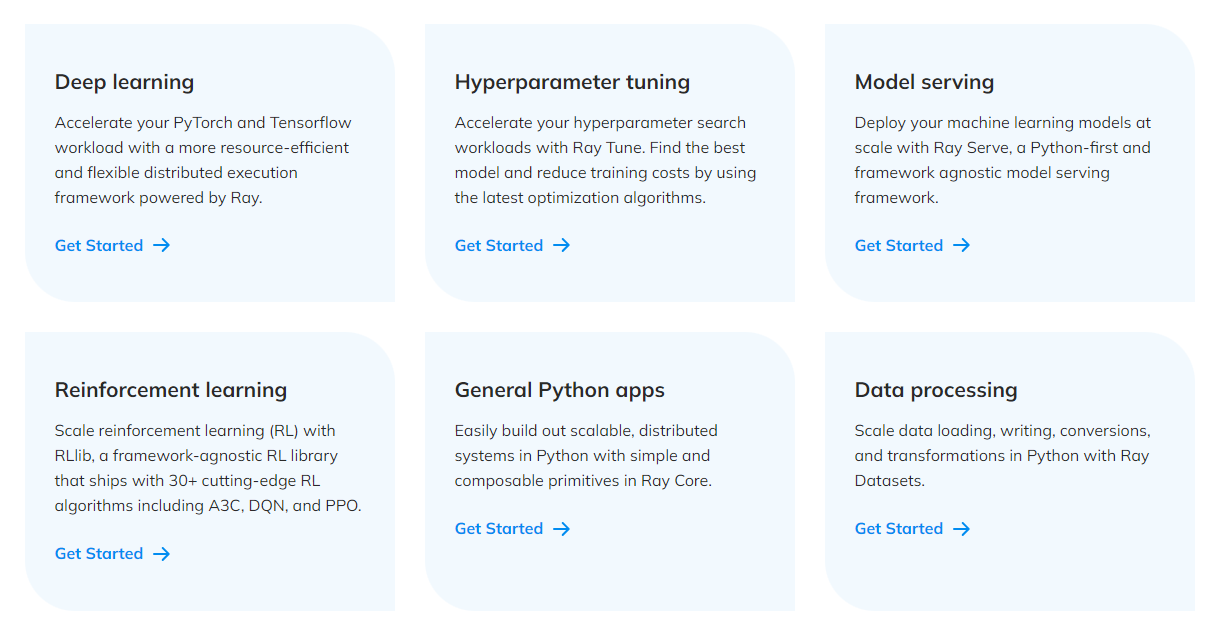
What comes in the box?
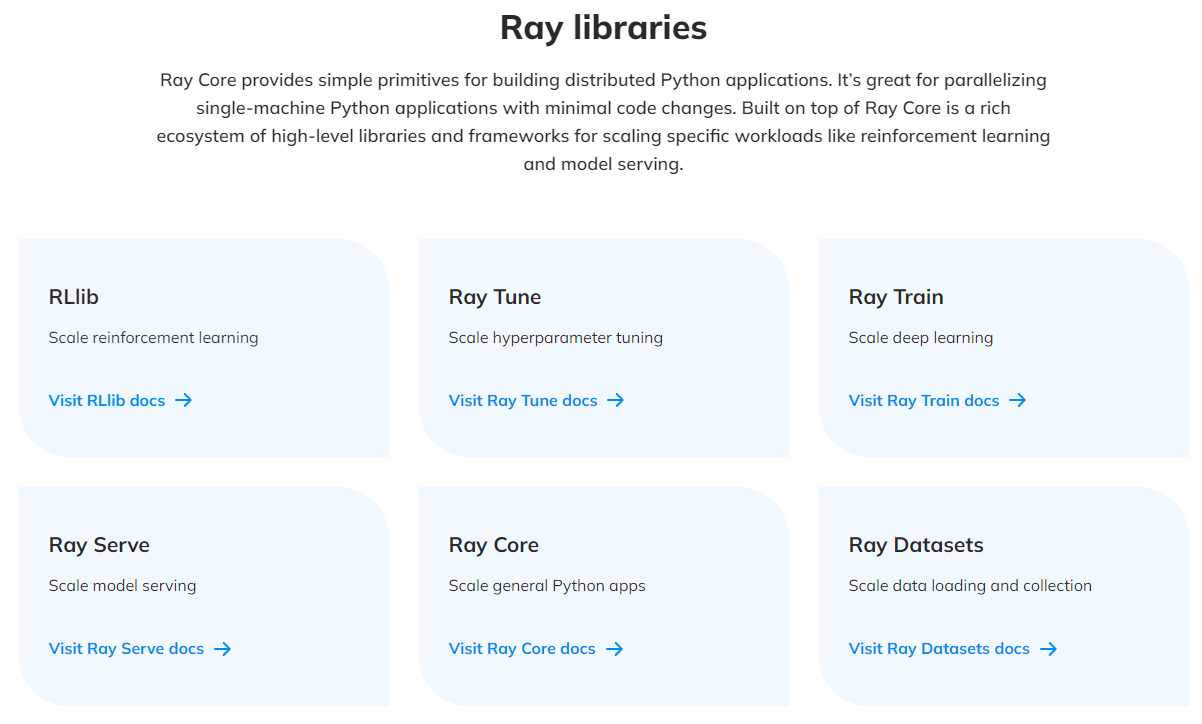
Our focus today …
Ray Core Ray Core provides a small number of core primitives (i.e., tasks, actors, objects) for building and scaling distributed applications.
Ray Datasets
Ray Datasets are the standard way to load and exchange data in Ray libraries and applications. They provide basic distributed data transformations such as maps (map_batches), global and grouped aggregations (GroupedDataset), and shuffling operations (random_shuffle, sort, repartition), and are compatible with a variety of file formats, data sources, and distributed frameworks.
Ray Core - Tasks
Ray enables arbitrary functions to be executed asynchronously on separate Python workers.
Such functions are called Ray remote functions and their asynchronous invocations are called Ray tasks.
```{python}
# By adding the `@ray.remote` decorator, a regular Python function
# becomes a Ray remote function.
@ray.remote
def my_function():
    # do something
    time.sleep(10)
    return 1

# To invoke this remote function, use the `remote` method.
# This will immediately return an object ref (a future) and then create
# a task that will be executed on a worker process.
obj_ref = my_function.remote()

# The result can be retrieved with ``ray.get``.
assert ray.get(obj_ref) == 1

# Specify required resources.
@ray.remote(num_cpus=4, num_gpus=2)
def my_other_function():
    return 1

# Ray tasks are executed in parallel.
# All computation is performed in the background, driven by Ray's internal event loop.
for _ in range(4):
    # This doesn't block.
    my_function.remote()
```
Ray Core - Actors
- Actors extend the Ray API from functions (tasks) to classes.
- An actor is a stateful worker (or a service).
- When a new actor is instantiated, a new worker is created, and methods of the actor are scheduled on that specific worker and can access and mutate the state of that worker.
```{python}
@ray.remote(num_cpus=2, num_gpus=0.5)
class Counter(object):
    def __init__(self):
        self.value = 0

    def increment(self):
        self.value += 1
        return self.value

    def get_counter(self):
        return self.value

# Create an actor from this class.
counter = Counter.remote()
# Call the actor.
obj_ref = counter.increment.remote()
assert ray.get(obj_ref) == 1
```
Ray Core - Objects
Tasks and actors create and compute on objects.
Objects are referred as remote objects because they can be stored anywhere in a Ray cluster
- We use object refs to refer to them.
Remote objects are cached in Ray’s distributed shared-memory object store
There is one object store per node in the cluster.
- In the cluster setting, a remote object can live on one or many nodes, independent of who holds the object ref(s).
Note
Remote objects are immutable. That is, their values cannot be changed after creation. This allows remote objects to be replicated in multiple object stores without needing to synchronize the copies.
Ray Core - Objects (contd.)
Ray on AWS EC2 — Single Node Setup
IAM integration — no credentials in code
```{python}
import boto3

# LabInstanceProfile is attached to your EC2 → boto3 auto-discovers it
s3 = boto3.client("s3")
buckets = [b["Name"] for b in s3.list_buckets()["Buckets"]]
print(buckets)  # → ['your-netid-dats6450', ...]

# Ray Data write_parquet also uses the instance role automatically
ray_ds.write_parquet("s3://your-bucket/results/")
```
Tip
Port-forward the Ray Dashboard (VSCode Ports panel → Add Port → 8265) or: ssh -L 8265:localhost:8265 ubuntu@YOUR_EC2_IP
Ray Datasets
Ray Datasets are the standard way to load and exchange data in Ray libraries and applications.
They provide basic distributed data transformations such as
maps,globalandgrouped aggregations, andshuffling operations.Compatible with a variety of file formats, data sources, and distributed frameworks.
Ray Datasets are designed to load and preprocess data for distributed ML training pipelines.
Datasets simplify general purpose parallel GPU and CPU compute in Ray.
- Provide a higher-level API for Ray tasks and actors for such embarrassingly parallel compute, internally handling operations like batching, pipelining, and memory management.
Ray Datasets
- Create
- Transform (note that you need to restrict
pandasto a version < 3.0)
```{python}
import pandas as pd

# Find rows with spepal length < 5.5 and petal length > 3.5.
def transform_batch(df: pd.DataFrame) -> pd.DataFrame:
    return df[(df["sepal length (cm)"] < 5.5) & (df["petal length (cm)"] > 3.5)]

transformed_dataset = dataset.map_batches(transform_batch)
print(transformed_dataset)
```- Consume
- Save
Ray Data — A Fuller ETL Pipeline
```{python}
import ray
import pyarrow.fs as pafs

ray.init(ignore_reinit_error=True)

# EXTRACT — anonymous S3 access (public NYC TLC bucket)
s3_anon = pafs.S3FileSystem(anonymous=True, region="us-east-1")
ds = ray.data.read_parquet(
    "nyc-tlc/trip data/yellow_tripdata_2023-01.parquet",
    filesystem=s3_anon,
)

# TRANSFORM — runs in parallel across all partitions
def clean_batch(df):
    df = df[(df["fare_amount"] >= 2.5) & (df["trip_distance"] > 0)]
    df["trip_duration_min"] = (
        (df["tpep_dropoff_datetime"] - df["tpep_pickup_datetime"])
        .dt.total_seconds() / 60
    )
    return df

cleaned_ds = ds.map_batches(clean_batch, batch_format="pandas")

# LOAD — IAM role handles auth; no credentials in code
cleaned_ds.write_parquet("s3://YOUR_BUCKET/ray-tutorial/results/")
```
Ray Data — map_batches in Detail
```{python}
# batch_format options
ds.map_batches(fn, batch_format="pandas")   # pd.DataFrame
ds.map_batches(fn, batch_format="numpy")    # dict of np.ndarray
ds.map_batches(fn, batch_format="pyarrow")  # pa.Table (default)

# Control parallelism
ds.map_batches(fn, batch_format="pandas", concurrency=4)
# ↑ limits to 4 parallel workers (useful to control memory)

# Control batch size
ds.map_batches(fn, batch_format="pandas", batch_size=10_000)
```
Laziness — Ray Data is lazy by default:
```{python}
# Nothing runs yet — just builds a logical plan
ds2 = ds.map_batches(clean_batch, batch_format="pandas") \
        .map_batches(add_features,  batch_format="pandas")

# Execution triggered by a sink operation:
ds2.count()           # → triggers full pipeline
ds2.to_pandas()       # → triggers full pipeline
ds2.write_parquet(…)  # → triggers full pipeline
```
Multi-Node Ray Cluster — ray up
# Start cluster (provisions EC2 + installs Ray on all nodes)
ray up ray-cluster.yaml

# Check cluster health
ray status

# Submit a Python script as a job
ray job submit \
  --working-dir . \
  --address ray://HEAD_IP:10001 \
  -- python my_etl.py

# Tear down (ALWAYS do this to stop billing!)
ray down ray-cluster.yaml
Key YAML structure:
provider:
  type: aws
  region: us-east-1
head_node_type: ray.head.default
worker_node_types:
  - name: ray.worker.default
    min_workers: 4
    max_workers: 4
available_node_types:
  ray.head.default:
    node_config:
      InstanceType: t3.large
      IamInstanceProfile:
        Name: LabInstanceProfile
setup_commands:
  - pip install "ray[data,serve,tune]>=2.54.0" pyarrow boto3
Important
Cost: $0.42/hr for 5× t3.large — always run ray down!
Cost & Performance on AWS Academy
| Configuration | CPUs | Cost/hr | Use case |
|---|---|---|---|
| 1× t3.large (single node) | 2 | $0.083 | Development, this tutorial |
| 3× t3.large cluster | 6 | $0.25 | Small parallel jobs |
| 5× t3.large cluster | 10 | $0.42 | Medium ETL pipelines |
When Ray pays off vs. bottleneck:
| Workload | Bottleneck | Ray benefit |
|---|---|---|
| S3 read → light transform | Network I/O | Low — 1–2× |
| ML training (PyTorch) | GPU / CPU | High with Ray Train |
Tip
Saving credits: ray.shutdown() in your notebook + ray down ray-cluster.yaml in terminal + Stop (not Terminate) your EC2 instance when done for the day.
Ray Train & XGBoost
Why XGBoost for Taxi Fare Prediction?
The task: predict fare_amount from trip features
Why tree models beat neural nets here
- Tabular data — no spatial/sequential structure to exploit
- Mixed feature types: integers (zone IDs, hour), floats (distance), categoricals (rate code)
- Small feature set (8 columns) — trees don’t need deep representation learning
- Interpretable — feature importance out of the box
Features used
| Feature | Type | Why it matters |
|---|---|---|
trip_distance |
float | Primary meter driver |
trip_duration_min |
float | Slow-traffic time charge |
RatecodeID |
int | JFK flat ~$70, Newark ~$90 |
PULocationID |
int | Airport pickups |
DOLocationID |
int | Airport dropoffs |
pickup_hour |
int | Demand patterns |
pickup_dow |
int | Weekend vs. weekday |
passenger_count |
int | Minor effect |
Note
RatecodeID is the single most predictive feature — the model learns JFK=$70 almost immediately.
Feature Engineering with Ray Data
```{python}
def prepare_for_model(df: pd.DataFrame) -> pd.DataFrame:
    """Clean + engineer + select — runs on each partition in parallel."""
    # Clean timestamps
    for col in ["tpep_pickup_datetime", "tpep_dropoff_datetime"]:
        if df[col].dt.tz is not None:
            df[col] = df[col].dt.tz_localize(None)

    # Filter outliers
    df = df[(df["fare_amount"] >= 2.50) & (df["fare_amount"] <= 300)]
    df = df[(df["trip_distance"] > 0) & (df["trip_distance"] <= 60)]

    # Engineered features
    df["trip_duration_min"] = (
        (df["tpep_dropoff_datetime"] - df["tpep_pickup_datetime"])
        .dt.total_seconds() / 60
    )
    df["pickup_hour"] = df["tpep_pickup_datetime"].dt.hour
    df["pickup_dow"]  = df["tpep_pickup_datetime"].dt.dayofweek

    return df[FEATURE_COLS + ENGINEERED_COLS + ["fare_amount"]]

# 3 months, ~9M rows — all transforms run in parallel
raw_ds   = ray.data.read_parquet(PARQUET_PATHS, filesystem=s3_anon)
model_ds = raw_ds.map_batches(prepare_for_model, batch_format="pandas")
model_df = model_ds.to_pandas()   # materialize
```
One pass — clean, filter, and engineer in a single map_batches call; Ray parallelises across all Parquet partitions.
Ray Train — Distributed XGBoost
```{python}
from ray.train.xgboost import XGBoostTrainer
from ray.train import ScalingConfig, RunConfig

# Convert pandas splits to Ray Datasets
train_ds = ray.data.from_pandas(train_df)
val_ds   = ray.data.from_pandas(val_df)

trainer = XGBoostTrainer(
    params={
        "objective": "reg:squarederror",
        "eval_metric": ["rmse", "mae"],
        "max_depth": 6,
        "eta": 0.1,
        "subsample": 0.8,
        "tree_method": "hist",
    },
    label_column="fare_amount",   # target column in the Ray Dataset
    num_boost_round=200,
    datasets={"train": train_ds, "valid": val_ds},
    scaling_config=ScalingConfig(
        num_workers=2,    # 2 Ray actors; each gets half the data
        use_gpu=False,
    ),
    run_config=RunConfig(storage_path="~/ray_results"),
)

result = trainer.fit()
```
Note
How it distributes: Ray Train spawns num_workers actors. XGBoost uses the Rabit ring-reduction protocol to synchronise gradient updates — identical result to single-node, just faster with more CPUs.
Hyperparameter Tuning — Ray Tune + ASHA
```{python}
from ray.tune.schedulers import ASHAScheduler
import ray.tune as tune

param_space = {
    "params": {
        "objective":        "reg:squarederror",
        "tree_method":      "hist",
        "max_depth":        tune.randint(3, 10),
        "eta":              tune.loguniform(0.01, 0.3),
        "subsample":        tune.uniform(0.6, 1.0),
        "colsample_bytree": tune.uniform(0.5, 1.0),
        "min_child_weight": tune.randint(1, 20),
    },
    "label_column":   "fare_amount",
    "num_boost_round": 100,
    "datasets":       {"train": tune_train_ds, "valid": tune_val_ds},
    "scaling_config": ScalingConfig(num_workers=2),
}

tuner = tune.Tuner(
    XGBoostTrainer,
    param_space=param_space,
    tune_config=tune.TuneConfig(
        metric="valid-rmse", mode="min",
        scheduler=ASHAScheduler(max_t=100, grace_period=20),
        num_samples=4,   # trials (increase on bigger instances)
    ),
)
results = tuner.fit()
best = results.get_best_result(metric="valid-rmse", mode="min")
```
ASHA (Asynchronous Successive Halving) — starts many short trials; kills poor performers early; no wasted compute on bad hyperparameters.
Model Evaluation & Batch Prediction
Test-set metrics (trained on Jan–Mar 2023)
| Model | MAE | RMSE | R² |
|---|---|---|---|
| Serial XGBoost (500k) | ~$2.20 | ~$3.80 | ~0.95 |
| Ray Train (full, default) | ~$2.10 | ~$3.60 | ~0.96 |
| Ray Train (tuned) | ~$1.90 | ~$3.40 | ~0.97 |
MAE ≈ $2 → off by about one stop on the meter
Batch prediction with Object Store
```{python}
model_ref = ray.put(pickle.dumps(booster))

def predict_batch(df, model_ref):
    booster = pickle.loads(model_ref)  # zero-copy read
    dm = xgb.DMatrix(df[FEATURES])
    df["predicted_fare"] = booster.predict(dm)
    return df

pred_ds = new_trips_ds.map_batches(
    predict_batch,
    fn_kwargs={"model_ref": model_ref},
    batch_format="pandas",
)
pred_ds.write_parquet("s3://bucket/predictions/")
```
Feature importance (Gain)
trip_distance     ████████████████  high
trip_duration_min ████████████      high
RatecodeID        ████████          high (nonlinear)
PULocationID      █████             medium
DOLocationID      ████              medium
pickup_hour       ██                low
pickup_dow        █                 low
passenger_count   ▌                 negligible
Tip
Use ray.put() to store the model in the Object Store once — all prediction workers get a zero-copy read. Avoid re-loading from S3 on every batch.
End-to-End Pipeline Summary
s3://adg-teaching/dats/data/nyt-data/  (Jan–Mar 2023, ~9M rows)
      │
      │  ray.data.read_parquet()          ← parallel S3 reads
      ▼
  Raw Ray Dataset
      │
      │  map_batches(prepare_for_model)   ← clean + engineer in parallel
      ▼
  Featurised DataFrame  (8 features + target)
      │
      ├──── 70% ──► Ray Dataset ──► XGBoostTrainer ──► Checkpoint
      │                              (ScalingConfig        │
      ├──── 15% ──► val Dataset ──►  num_workers=2)   ray.tune.Tuner
      │                                                    │
      └──── 15% ──► test split  ◄── XGBoostPredictor ◄────┘
                       │
                       ▼
                  MAE / RMSE / R²
                  Feature importance
                       │
                       ▼
            s3://bucket/models/xgb_fare_model.pkl   (persisted)
                       │
      New trips ──► map_batches(predict_batch) ──► s3://bucket/predictions/
Note
Changing ScalingConfig(num_workers=2) to num_workers=10 on a 5-node cluster is the only code change needed to scale training — Ray handles data sharding and gradient synchronisation automatically.