Lecture 11

Spark Structured Streaming

Looking Back

  • Introduction to Apache Spark
  • Spark RDDs, DataFrames, SparkSQL
  • Spark Diagnostic UI, UDFs
  • Spark MLlib, Spark NLP

Today

  • Batch vs. Streaming
  • DStreams (legacy)
  • Spark Structured Streaming
  • Output modes, triggers, state
  • Event-time windows and watermarks

From Batch to Streaming

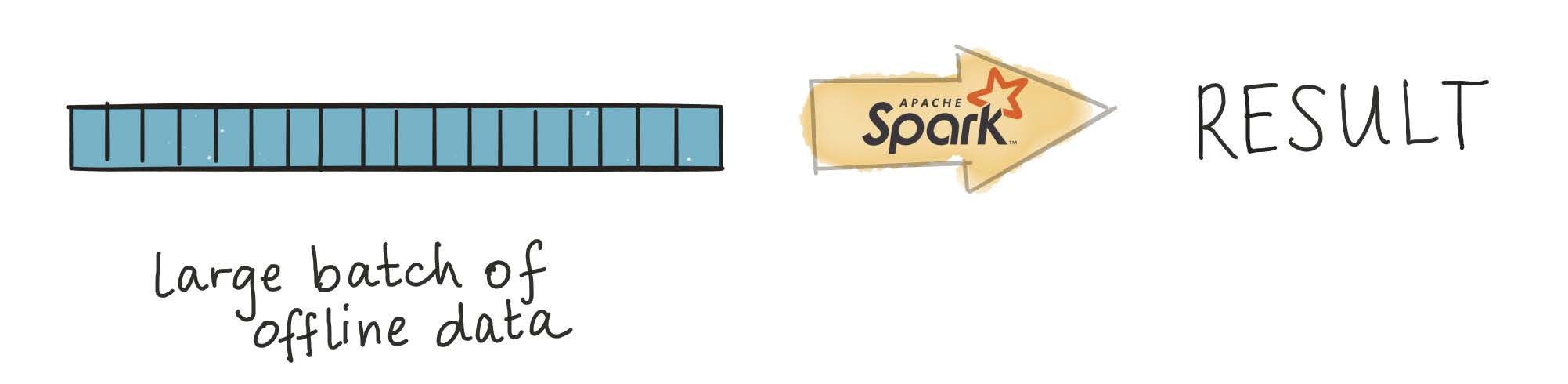
Up to now, we’ve worked with batch data

Processing large, already-collected batches of data.
Batch examples

Examples of batch data analysis?

  • Analysis of terabytes of logs collected over a long period of time

  • Analysis of code bases on GitHub or large repositories like Wikipedia

  • Nightly analysis on datasets collected over a 24-hour period

Streaming examples

Examples of streaming data analysis?

  • Credit card fraud detection

  • Sensor data processing

  • Online advertising based on user actions

  • Social media notifications

IDC forecasts that by 2025 IoT devices will generate 79.4 zettabytes of data.

How do we work with streams?

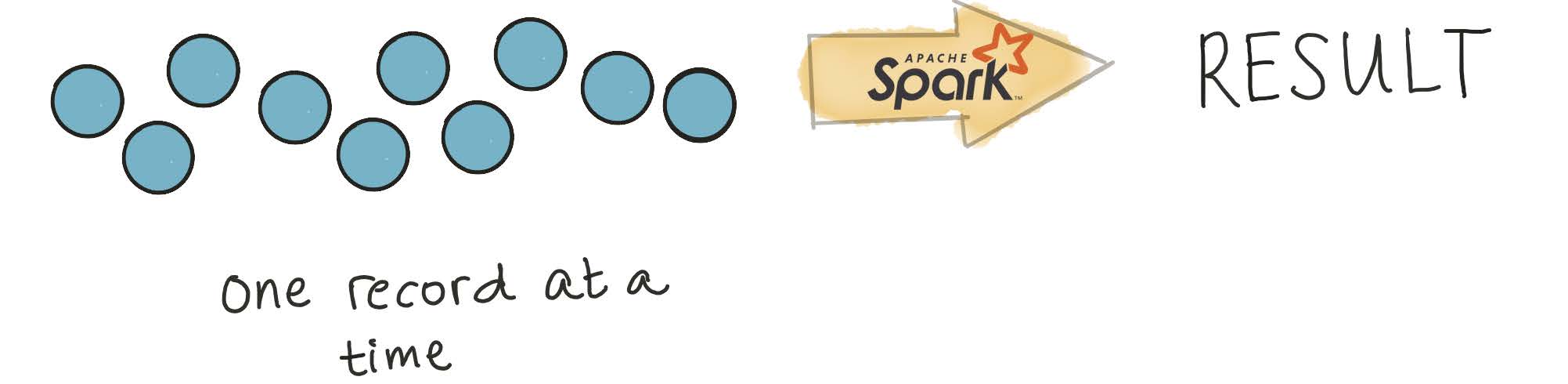
Processing every value from a stream of data — values that are constantly arriving.
DStreams (Legacy)

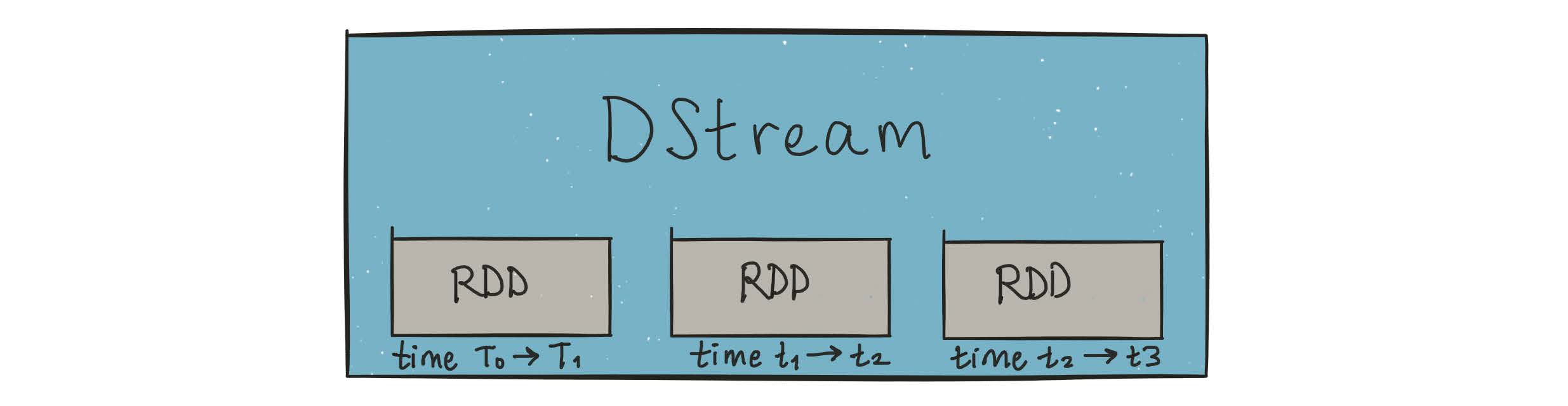
Spark solved this with DStreams — via microbatching

DStreams are represented as a sequence of RDDs.
A StreamingContext is created from an existing SparkContext:

sc = ...
ssc = StreamingContext(sc, 1)   # batch interval: 1 second

Important constraints of StreamingContext

  1. Once started, no new streaming computations can be set up

  2. Once stopped, it cannot be restarted

  3. Only one StreamingContext can be active per Spark session

  4. stop() on StreamingContext also stops SparkContext

  5. Multiple contexts can be created as long as the previous one is stopped first

DStreams had significant issues

  • No unified API for batch and stream: Developers had to explicitly rewrite code to use different classes when converting batch jobs to streaming jobs.

  • No separation between logical and physical plans: Spark Streaming executes DStream operations in exactly the sequence specified — no scope for automatic optimization.

  • No native event-time window support: DStreams only support windows based on processing time (when Spark received the record), not event time (when the record was actually generated). This made building accurate pipelines difficult.

Structured Streaming

What is Structured Streaming?

A single, unified programming model for batch and stream processing

Familiar SQL or batch-like DataFrame queries work on your stream exactly as they would on a batch — fault tolerance, optimization, and late data are handled by the engine.

A broader definition of stream processing

The line between real-time and batch processing has blurred significantly. Structured Streaming supports anything from continuous streaming to periodic micro-batch (e.g., every few hours) with the same code.

The Programming Model

The Programming Model

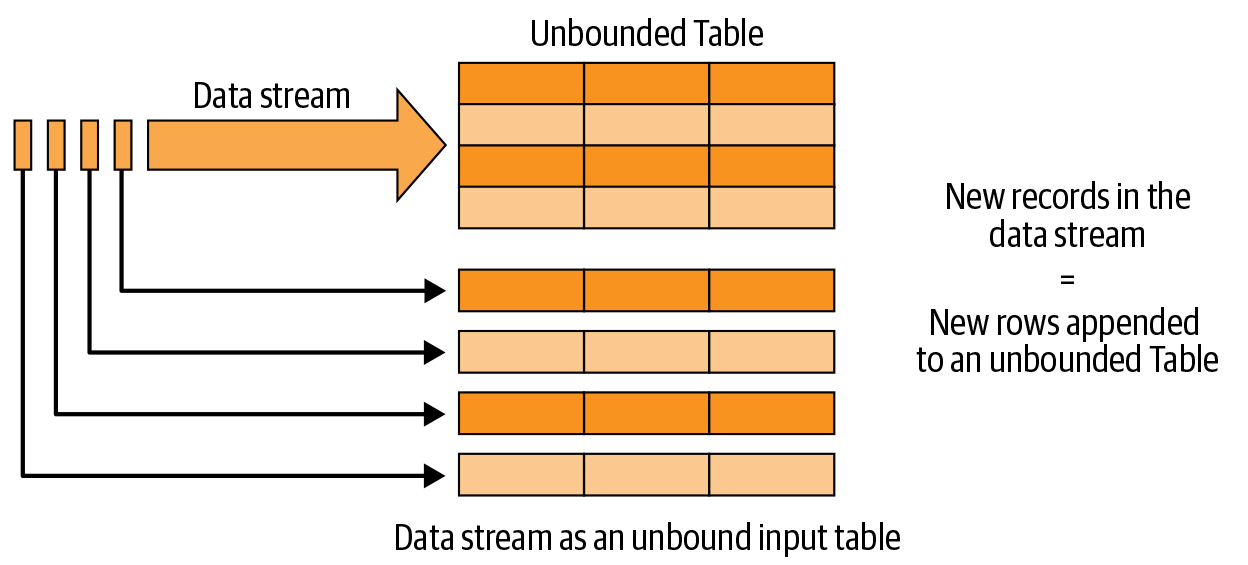
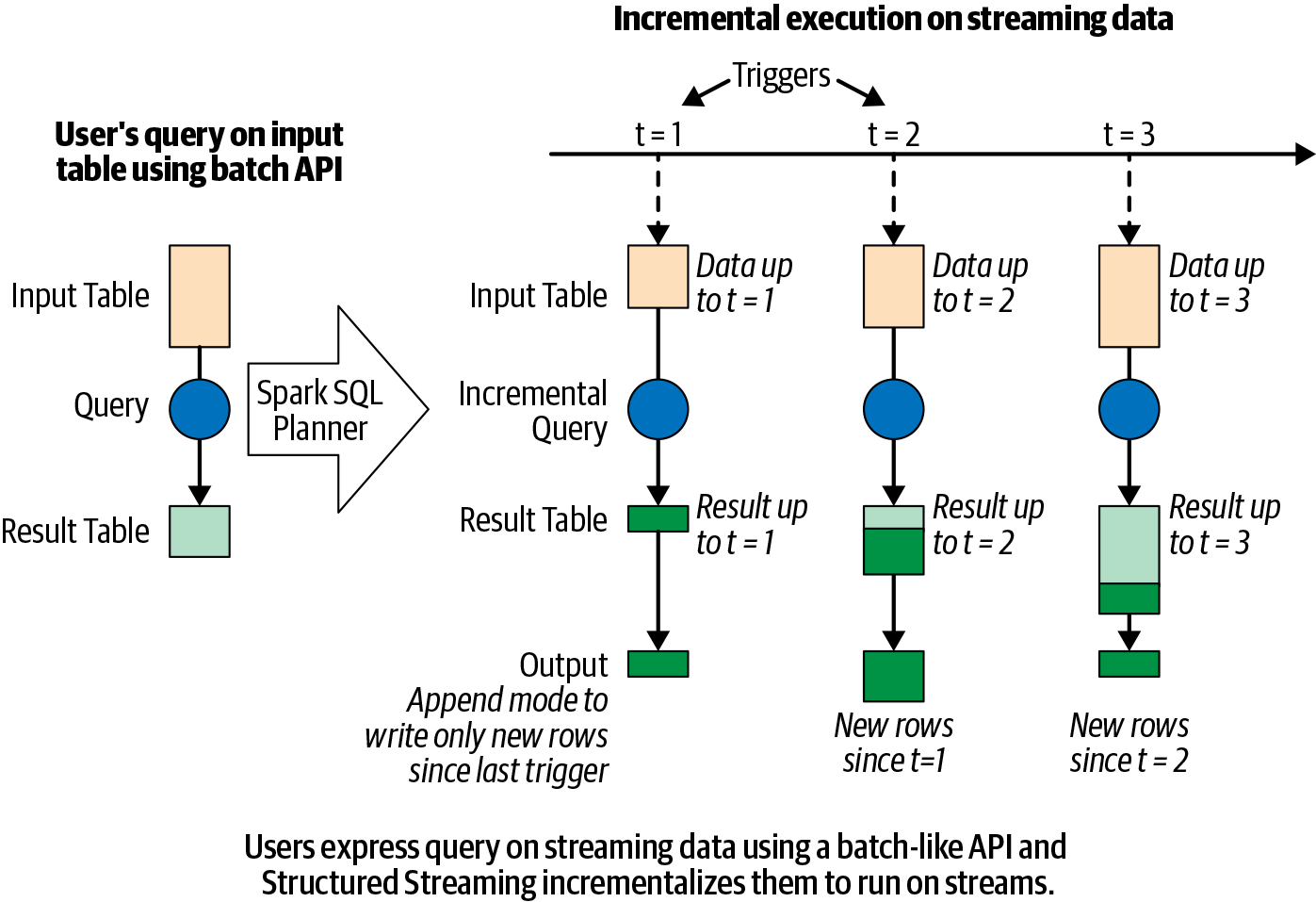
  • Every new record in the data stream is a new row appended to an unbounded input table
  • Spark automatically converts the batch-like query to a streaming execution plan (incrementalization)
  • Spark figures out what state to maintain to update results as records arrive
  • Triggering policies control when results are updated
Specifying output mode

Append mode

Only new rows added to the result table since the last trigger are written to output. Applicable only when existing rows cannot change (e.g., map operations on input streams).

Update mode

Only rows that were updated since the last trigger are written. Requires a sink that supports in-place updates (e.g., a database table).

Complete mode

The entire updated result table is written to output after every trigger. Typically used with aggregations.

The 5 Fundamental Steps

Overview

  1. Define input sources

  2. Transform data

  3. Define output sink and output mode

  4. Specify processing details

  5. Start the query

1. Define input sources

spark = SparkSession...

lines = (spark
    .readStream.format("socket")
    .option("host", "localhost")
    .option("port", 9999)
    .load())
  • readStream (not read) signals a streaming source
  • This sets up configuration only — data reading begins when the query starts
  • Besides sockets, Spark natively supports Apache Kafka and file-based formats (Parquet, ORC, JSON)
  • A query can define multiple input sources, combined with unions or joins

2. Transform data

from pyspark.sql.functions import *

words = lines.select(split(col("value"), "\\s").alias("word"))
counts = words.groupBy("word").count()
  • Use the usual DataFrame operations — they work identically on streaming DataFrames
  • The same code runs as both a batch query and a streaming query

3. Define output sink and output mode

writer = counts.writeStream \
    .format("console") \
    .outputMode("complete")
  • format: "console", "parquet", "kafka", "memory", etc.
  • outputMode: "append", "update", or "complete"

4. Specify processing details

checkpointDir = "..."

writer2 = (writer
    .trigger(processingTime="1 second")
    .option("checkpointLocation", checkpointDir))

Triggering options:

  • Default: Next micro-batch triggers as soon as the previous one completes
  • Processing time interval: Fixed interval (e.g., "1 second", "5 minutes")
  • Once: Exactly one micro-batch — useful for scheduled runs to control cost
  • Continuous: Experimental as of Spark 3.0 — low-latency, millisecond processing

5. Start the query

streamingQuery = writer2.start()

# Block until query terminates (or use await in notebooks)
streamingQuery.awaitTermination()

Spark Streaming Under the Hood

Spark Streaming under the hood

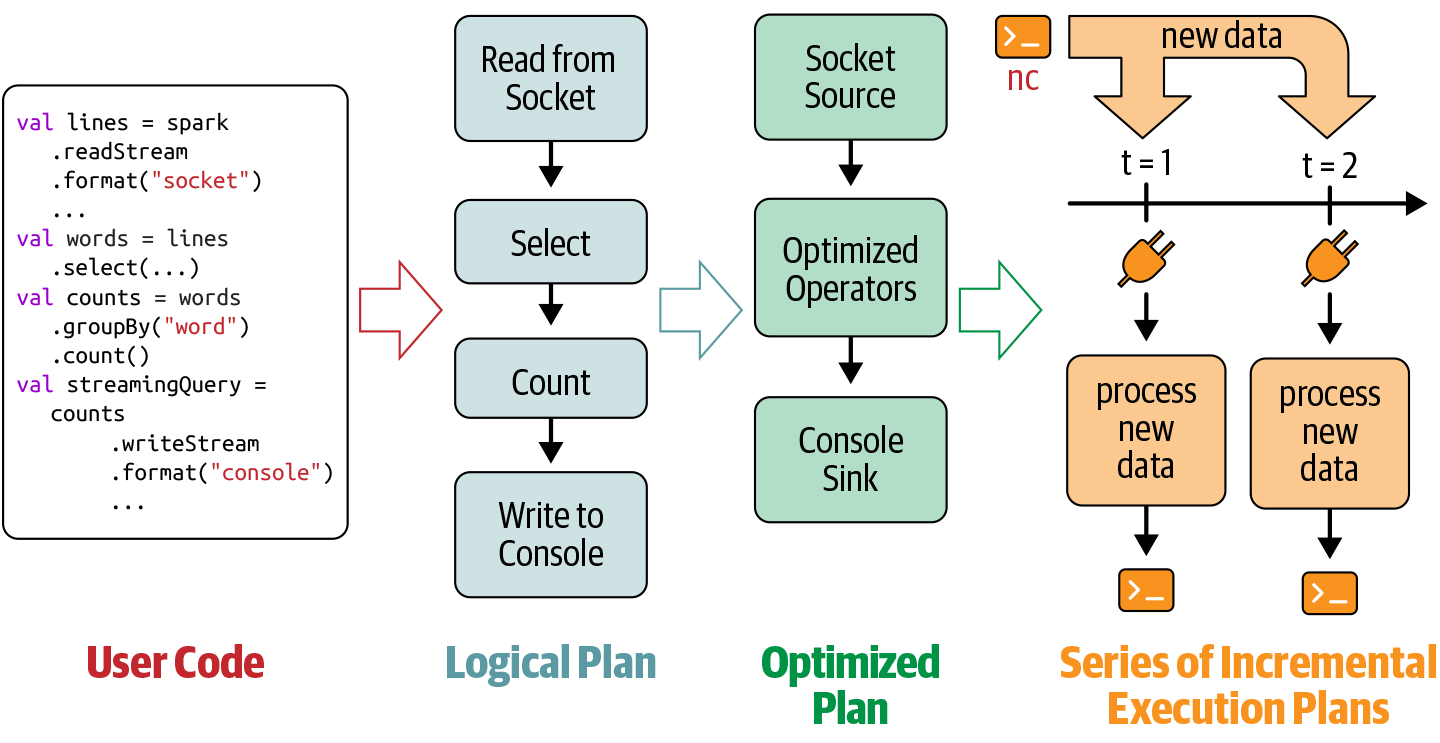
  1. Spark SQL analyzes and optimizes the logical plan to ensure incremental, efficient execution on streaming data.

  2. Spark SQL starts a background thread that continuously executes a loop.

  3. The loop continues until the query is terminated.
The execution loop

Each iteration:

  1. Based on the configured trigger, the thread checks streaming sources for new data.

  2. New data is executed as a micro-batch — an optimized execution plan reads the data, computes the incremental result, and writes output to the sink.

  3. The exact range of data processed and any associated state are checkpointed to allow deterministic reprocessing on failure.

The loop terminates when…

  1. A failure occurs (processing error or cluster failure) → restart from last checkpoint

  2. The query is explicitly stopped via streamingQuery.stop()

  3. The trigger is set to Once → stops after processing all available data

Data Transformations

Stateless vs. Stateful transformations

Each execution is a micro-batch. Operations fall into two categories:

Stateless transformations

select(), explode(), map(), flatMap(), filter(), where() — each input record is processed independently, with no memory of previous rows.

  • Supports append and update output modes (not complete)
  • Safe to use with append-only sinks like files

Stateful transformations

groupBy().count() and other aggregations require maintaining state — a running tally across micro-batches.

  • State is held in executor memory and checkpointed to disk for fault tolerance
  • Supports all three output modes
  • The engine automatically manages state lifecycle for correctness

Stateful Streaming Aggregations

Types of stateful aggregations

Structured Streaming supports two classes:

  • Aggregations by key — e.g., streaming word count grouped by word

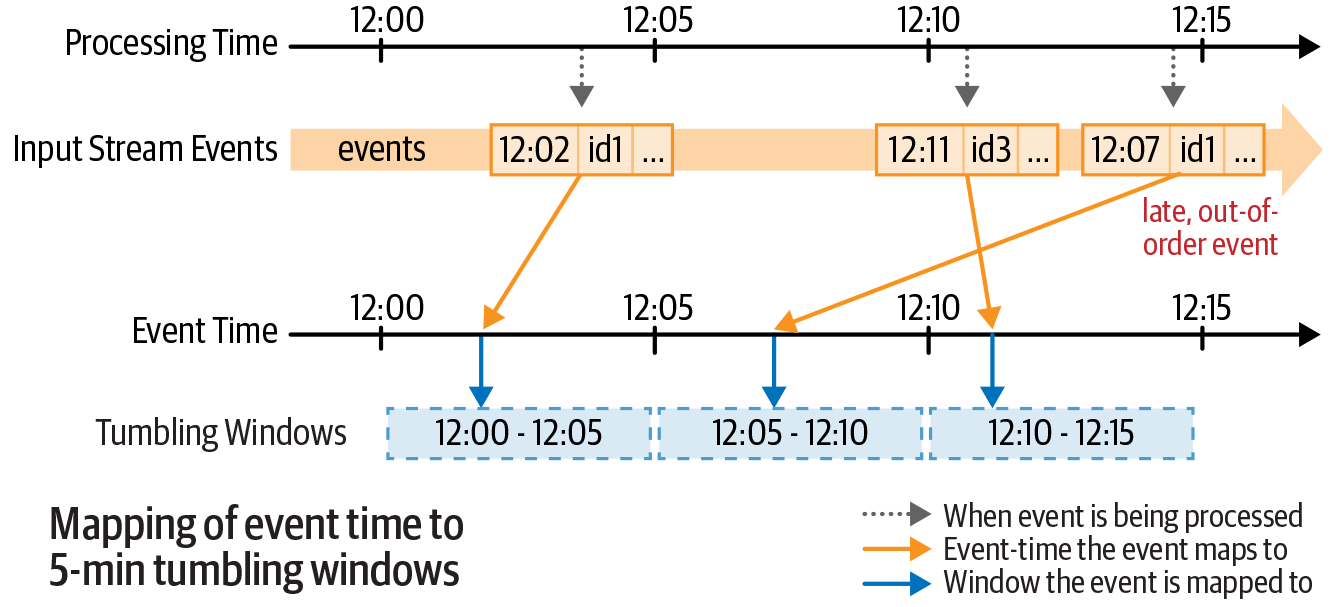
  • Aggregations by event-time window — e.g., count records received per 5-minute window

Event-time windows — tumbling

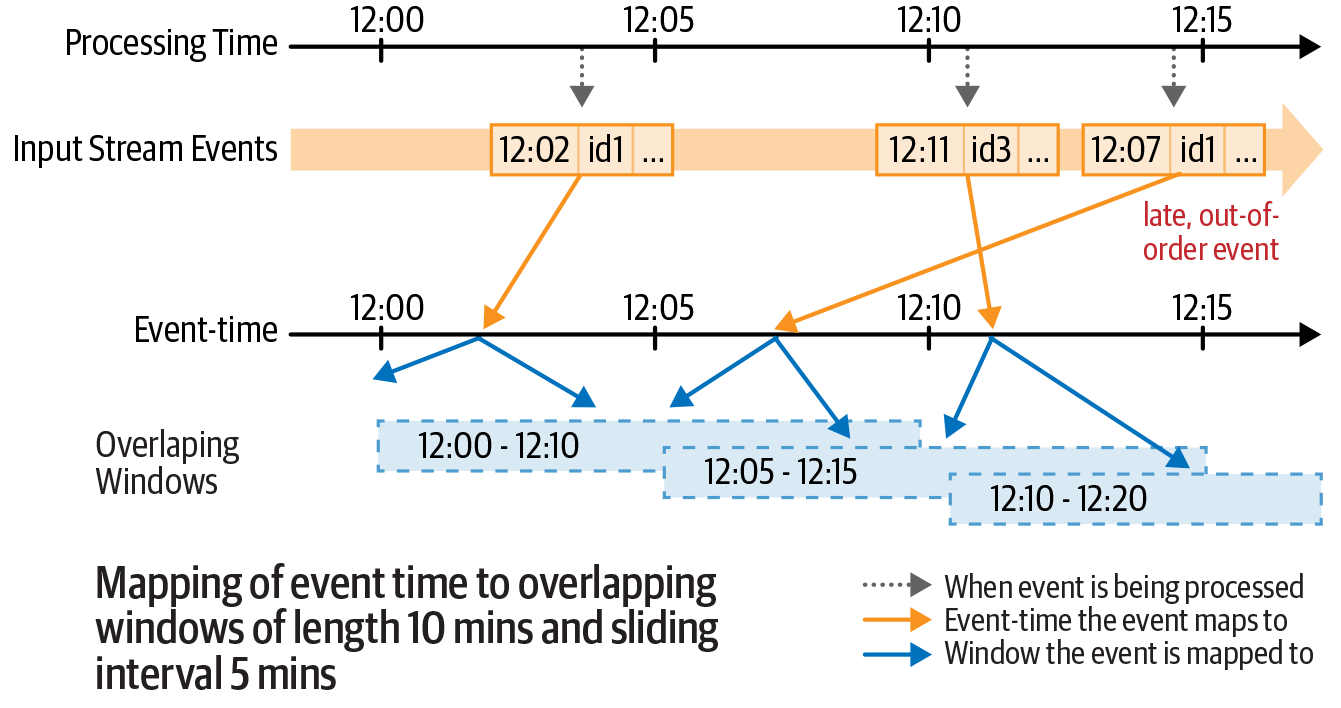
Non-overlapping, fixed-size windows. Each event falls in exactly one window.
Event-time windows — sliding

Overlapping windows of fixed size and stride. An event can fall in multiple windows.
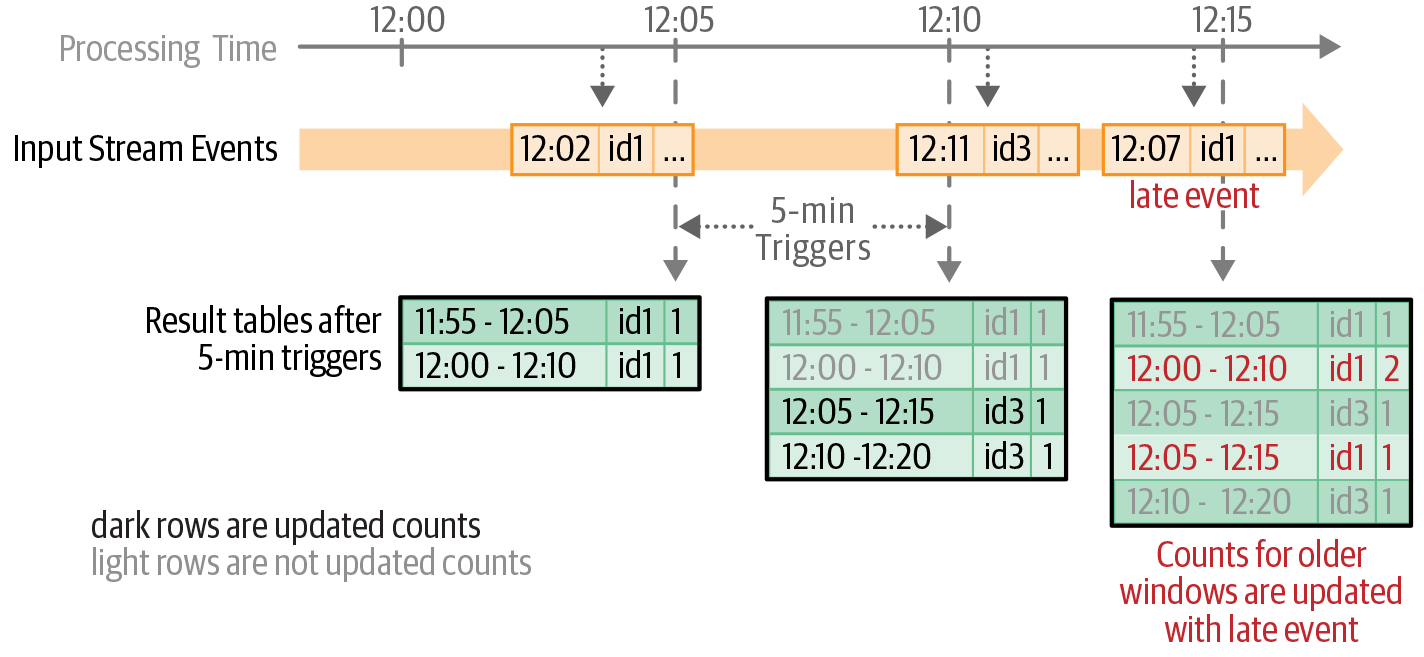
Updated counts after each trigger
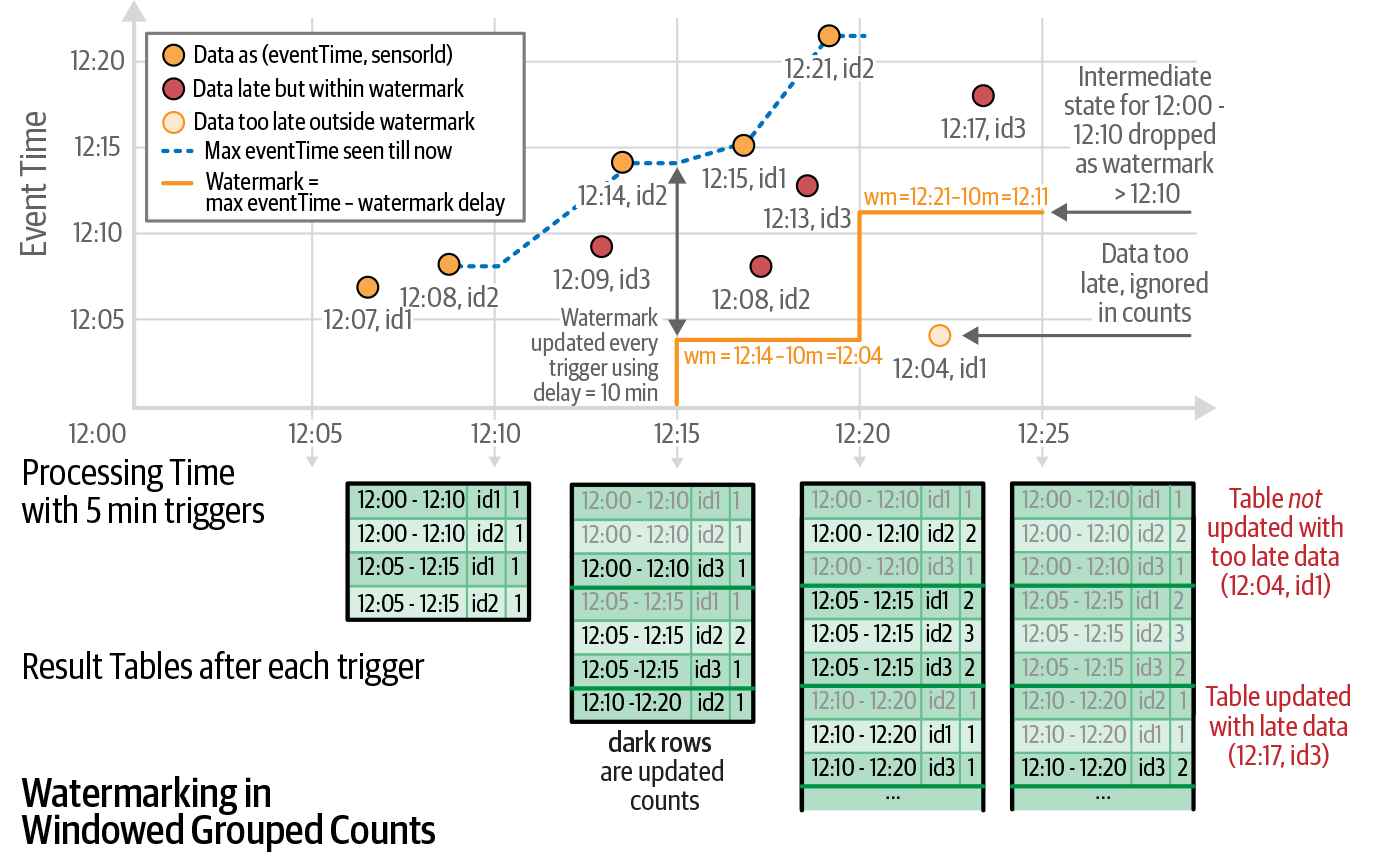
Handling late data — watermarks

Late-arriving data is common in distributed systems (network delays, out-of-order records). A watermark tells Spark how late data can be while still being included.

A watermark is a moving threshold in event time that trails behind the maximum event time seen by the query. The trailing gap — the watermark delay — defines how long the engine waits for late data.
Defining a watermark in code

from pyspark.sql.functions import window

windowedCounts = (words
    .withWatermark("timestamp", "10 minutes")   # tolerate 10 min of lateness
    .groupBy(
        window(col("timestamp"), "5 minutes", "1 minute"),  # 5-min sliding windows
        col("word")
    )
    .count()
)
  • Records older than (max observed event time − watermark delay) are dropped
  • Enables memory-bounded state management for long-running streams

Cloud Streaming Ingestion

AWS Kinesis

  • Similar to Apache Kafka — managed stream ingestion
  • Abstracts away configuration and cluster management
  • Pricing based on usage (per shard-hour and PUT payload)

Kinesis vs. Kafka comparison

Spark SQL Connector for AWS Kinesis

Use Kinesis as a source or sink in Spark Structured Streaming:

kinesisDF = (spark.readStream
    .format("kinesis")
    .option("streamName", "my-stream")
    .option("region", "us-east-1")
    .option("initialPosition", "LATEST")
    .load())

qubole/kinesis-sql connector